Status
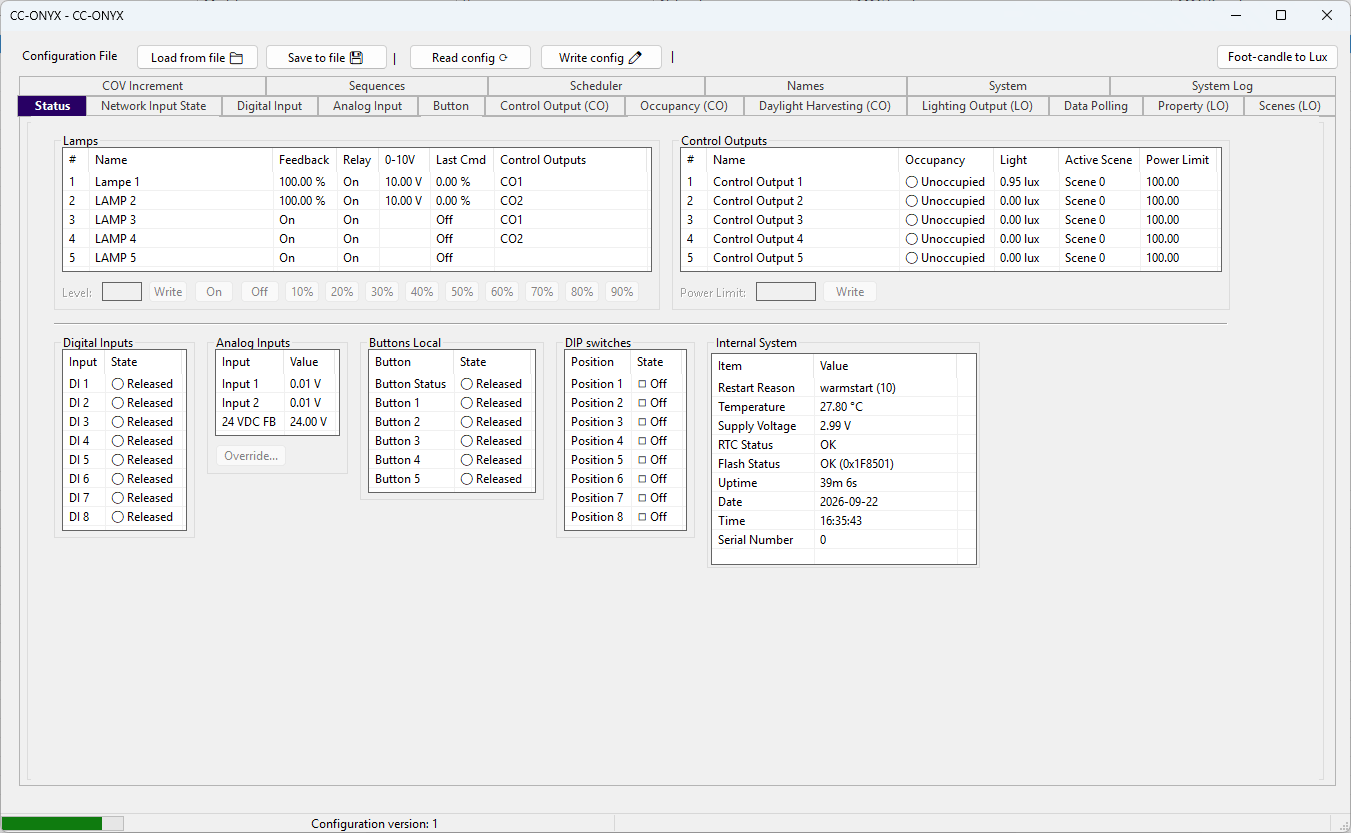
The Status tab shows a live view of the controller. Values refresh automatically while the tab is open. Colors flag the state of each value: green for normal, orange for a warning or an overridden value, and red for a fault.
Lamps

Live state of each lighting output.
| Column | Description |
|---|---|
| # | Lighting output number. |
| Name | Configured lamp name. |
| Feedback | Measured output level (percent for dimming lamps, On or Off for relay-only lamps). |
| Relay | State of the lamp relay. |
| 0-10V | Measured 0-10V output (dimming lamps only). |
| Last Cmd | Last command sent to the lamp. |
| Control Outputs | Control outputs that drive this lamp. |
Select one or more lamps to command them from the action bar below the list. Use the On, Off, and preset percentage buttons, or type a value in Level and press Write. The numeric level and presets apply to dimming lamps only.
Control Outputs

Live state of each control output.
| Column | Description |
|---|---|
| # | Control output number. |
| Name | Configured control output name. |
| Occupancy | Occupancy state of the output. |
| Light | Measured light level in lux. |
| Active Scene | Scene currently active on the output. |
| Power Limit | Current power limit. |
Select one or more control outputs, enter a value in Power Limit, and press Write to apply a new limit.
Digital Inputs

State of the eight digital inputs (DI 1 to DI 8), each shown as Released or Pressed.
Analog Inputs

Value of the analog inputs (Input 1, Input 2, and 24 VDC FB). Select an input and press Override... to force a value. An overridden input is shown in orange. From the override dialog, use Release to return the input to its measured value.
Buttons Local

State of the local button status and buttons 1 to 5, each shown as Released or Pressed.
DIP switches

Position of the eight DIP switches (Position 1 to Position 8), each shown as On or Off.
Internal System

Diagnostic information read from the controller.
| Item | Description |
|---|---|
| Restart Reason | Reason for the last restart. |
| Temperature | Internal temperature of the controller. |
| Supply Voltage | Measured supply voltage. |
| RTC Status | State of the real-time clock. |
| Flash Status | Result of the flash memory check. |
| Uptime | Time elapsed since the last restart. |
| Date | Local date (shown when a real-time clock is present). |
| Time | Local time (shown when a real-time clock is present). |
| Serial Number | Serial number of the controller. |