Installation
Installation
Installation on a junction box
The room controller can be installed to a junction box with a 1 inch [2.54 cm] knockout.
Refer to the dimensions of the room controller to correctly choose junction box with the appropriate height for the installation.
-
Remove the lock nut from the 1 inch [2.54 cm] nipple.
-
Insert the wires and the 1 inch [2.54 cm] nipple through the junction box knockout.
-
Reinstall the lock nut.

Installation with screws
The room controller can be fixed on a flat surface with screws.
- Fix the room controller using four screws through the holes of the mounting tabs.
Cover locks
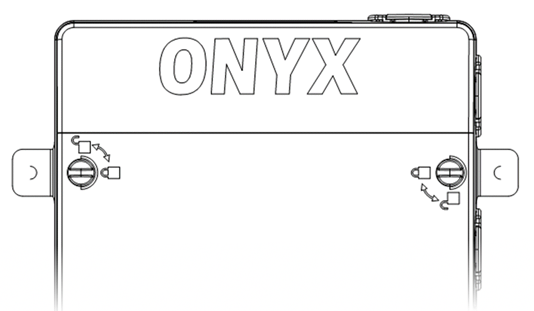
Use a flathead screwdriver to lock and unlock the cover.
Turn the cover locks a quarter turn clockwise to lock the cover.
Turn the cover locks a quarter turn counterclockwise to unlock the cover.
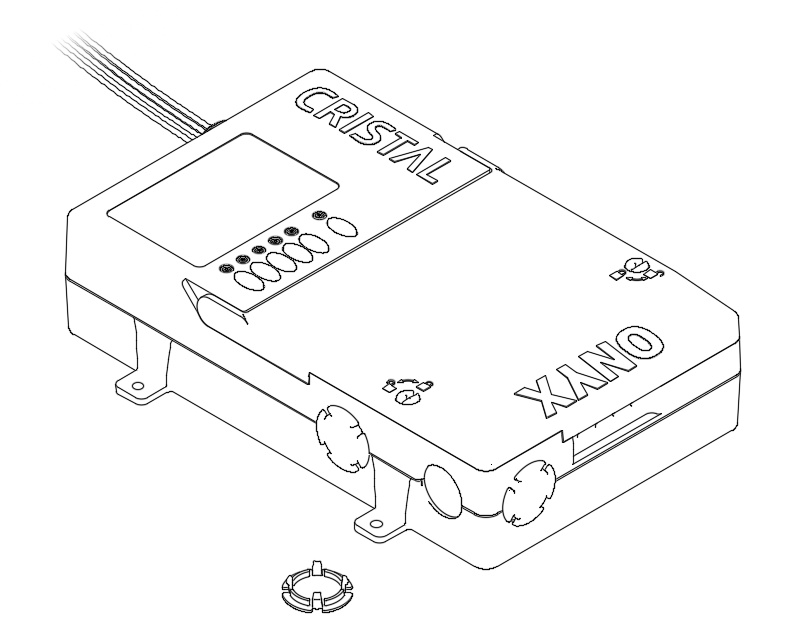
Holes with cover
The three holes with covers allow to pass the wires to the terminal blocks.
With the cover removed, a cable clamp connector can be used to pass the wires inside the room controller.
ONYX Quick Connect Accessories Connectors
Use the 4 openings to easily pass the cables to the ONYX Quick Connect connectors.
 | WARNING: ELECTRICAL RISK The four ONYX Quick Connect connectors are only intended for the connection of CC-ONYX compatible accessories. Do not connect any other type of equipment to those connectors, including standard Ethernet equipment. Otherwise, irreversible damage may result both to the room controller and to the connected equipment. |
|---|
The ONYX Quick Connect connectors are named QUICK CONNECT 1 (QC) and QUICK CONNECT 2 (QC).
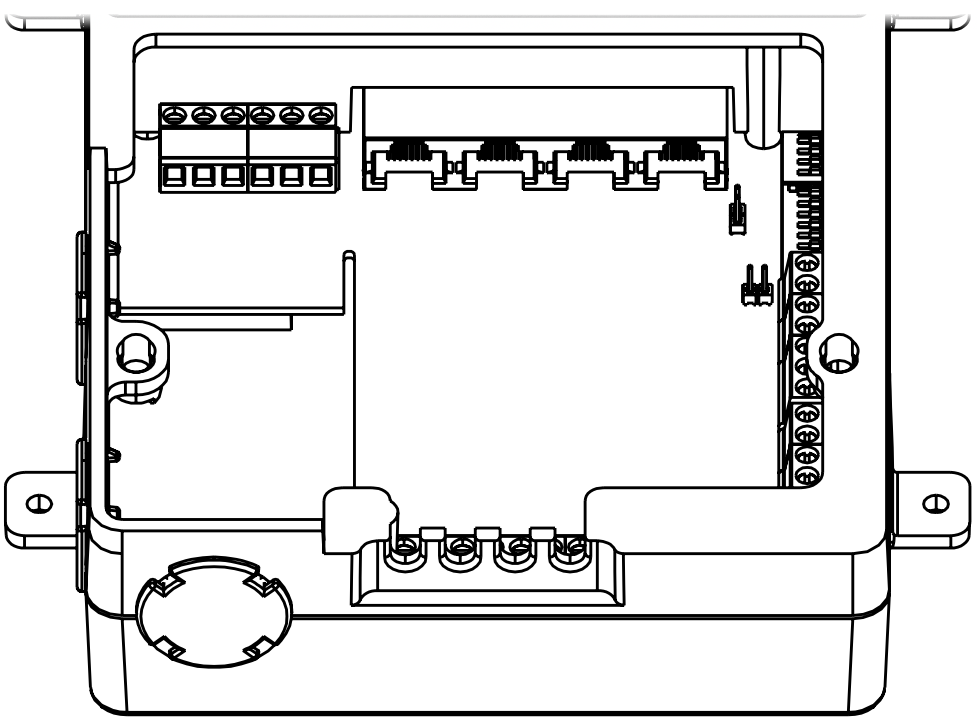
Identifications
Lead Wires Identification
| Color | Description |
|---|---|
| BLACK | 120-347 Vac power supply line. |
| WHITE | 120-347 Vac power supply neutral. |
| RED | Relay 1 contact line. |
| BLUE | Relay 2 contact. |
| BLUE | Relay 2 contact. |
Buttons and LED Indicators Identification
| Name | Description |
|---|---|
| LED STATUS | Indicates the status of the configuration. |
| BUTTON STATUS | Allows rebooting or reset the configuration. |
| LED 1 LED 2 LED 3 LED 4 LED 5 | Indicates the status of the associated output. |
| BUTTON 1 BUTTON 2 BUTTON 3 BUTTON 4 BUTTON 5 | Tests of the associated output. |
Terminals Identification
Inputs
| Name | Description |
|---|---|
| DI5 - OCCUPANCY 1 | Digital input for the contact of occupancy sensors. |
| AI1 - DAYLIGHT 1 | Analog input for the 0-10 Vdc light level sensor. |
| DI1 - SWITCH 1 | Digital input for the switch 1. |
| DI2 - SWITCH 2 | Digital input for the switch 2. |
| DI3 - SWITCH 3 | Digital input for the switch 3. |
| DI4 - SWITCH 4 | Digital input for the switch 4. |
| Name | Description |
|---|---|
| DI6 - AUX IN 1 | Dry contact input for the building automation system (B.A.S.). |
| COMMON AUX IN | Common signal for the inputs DI6 - AUX IN 1 and DI7 - AUX IN 2. |
| DI7 - AUX IN 2 | Dry contact input 1. |
| AI2 - DAYLIGHT 2 | Generic 0-10 Vdc input. |
| COMMON | Common signal for the inputs AI2 - DAYLIGHT 2 and DI8 - OCCUPANCY 2. |
| DI8 - OCCUPANCY 2 | Dry contact input 2. |
| +24V OUT | Power supply of 24 Vdc / 140 mA, for the light level sensor, occupancy sensors and wall switches. |
Inputs ONYX Quick Connect
| Name | Description |
|---|---|
| QUICK CONNECT 1 (QC) | RJ45 quick connect for compatible accessories. |
| QUICK CONNECT 2 (QC) | RJ45 quick connect for compatible accessories. |
Communication Network
| Name | Description |
|---|---|
| NET + | RS-485 communication, positive signal. |
| NET – | RS-485 communication, negative signal. |
| NET COM | RS-485 communication, common signal. |
| DA | DALI communication signal. |
| DA | DALI communication signal. |
Outputs
| Name | Description |
|---|---|
| AO1 - OUTPUT 0-10V 1 (+) | Positive signal for the 0-10 Vdc output 1. To be connected to the positive 0-10 Vdc signal of ballasts or LED drivers. |
| AO1 - OUTPUT 0-10V 1 (–) | Common of the 0-10 Vdc output 1. To be connected to the common 0-10 Vdc signal of ballasts or LED drivers. |
| AO2 - OUTPUT 0-10V 2 (+) | Positive signal for the 0-10 Vdc output 2. To be connected to the positive 0-10 Vdc signal of ballasts or LED drivers. |
| AO2 - OUTPUT 0-10V 2 (–) | Common of the 0-10 Vdc output 2. To be connected to the common 0-10 Vdc signal of ballasts or LED drivers. |
| DO3 - RELAY 3 AUX | Dry contact output for the occupancy. |
| DO4 - RELAY 4 AUX | Dry contact output for the receptacle control. |
| DO5 - RELAY 5 AUX | Dry contact output for generic uses. |
Jumpers Identification
| Name | Description |
|---|---|
| Active +24V OUT | When activated, it connects the power supply +24V OUT to the ONYX Quick Connect connectors for use with compatible accessories. |
| INT. GND | When activated, it connects the internal common of the controller to the terminal COMMON AUX IN. |
Dipswitches Identification
CONFIG
| Name | Description |
|---|---|
| CONFIG | Allows to enable or disable software options. |
| TERM | The position ON enables the RS-485 termination resistor. |
| BIAS+ | The position ON enables the RS-485 positive bias voltage. |
| BIAS– | The position ON enables the RS-485 negative bias voltage. |
SCENARIOS
| Name | Description |
|---|---|
| 1-8 | Allows selecting the predefined operating scenarios. |
Wiring
Before the beginning of the wiring, turn off the power supply and verify that there is no voltage using a voltmeter. After the wiring is completed, verify that it is correct before turning on the power supply to avoid damaging the room controller and the connected accessories.
Screw type terminal blocks wires
| Value | |
|---|---|
| Wire Range | 24-12 AWG [2.5 mm²] |
| Strip Length | 9/32” [7 mm] |
Maximum wires length for 0-10V outputs
| Diameter | Length |
|---|---|
| 18 AWG [0.75 mm²] | 164 feet [50 meters] |
| 16 AWG [1.5 mm²] | 328 feet [100 meters] |
| 14 AWG [2.5 mm²] | 492 feet [150 meters] |
Buttons and LED Indicators
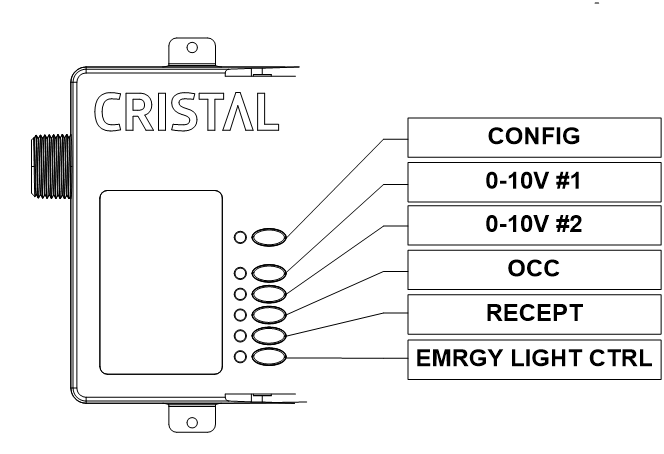
Buttons
The buttons 1, 2, 3, 4 and 5 allow testing the associated outputs by cycling their states.
For dimming outputs, it cycles between 0%, 50% and 100% with each press of the associated button.
For non-dimming outputs, it cycles between Off and On with each press of the associated button.
The STATUS button allows resetting the controller.
LED Indicators
The LED indicators 1, 2, 3, 4 and 5 allow visualizing the current state of the associated output. When a LED indicator is Off the associated output is Off and On otherwise.
For dimming outputs, the LED indicators is Off when the associated output is at 0%, it is On otherwise.
For non-dimming outputs, the LED indicator is Off when the associated output is Off, it is On when the associated output is On.
The STATUS LED indicator shows the status of the controller. It is slowly blinking in normal operation and can also show the reset state.
Inputs
Occupancy Sensor
Support the integration of contact occupancy sensors. Occupancy state actions are configurable via configuration software or the dipswitches SCENARIOS. The +24V OUT signal can be used to provide power supply to the occupancy sensors.
The occupancy input is named DI5 - OCCUPANCY 1 and QUICK CONNECT 1 (QC).
Light Level Sensor
Support the integration of 0-10 Vdc light level sensor. The lux reading range is configurable via the configuration software or the dipswitches SCENARIOS. Light level is used in daylight harvesting control. Daylight harvesting is configurable via configuration software or the dipswitches SCENARIOS. The +24V OUT signal can be used to provide power supply the light level sensor.
The light level inputs are named AI1 - DAYLIGHT 1, QUICK CONNECT 1 (QC) and AI2 - DAYLIGHT 2.
Wall-Switches
Support the integration of momentary push buttons and maintained switches. The associated actions are configurable via configuration software or the dipswitches SCENARIOS. The +24V OUT signal can be used for the common signal of the wall-switches.
The wall-switch inputs are named DI1 - SWITCH 1, DI2 - SWITCH 2, DI3 - SWITCH 3, DI4 - SWITCH 4, QUICK CONNECT 1 (QC) and QUICK CONNECT 2 (QC).
Isolated Digital Inputs
Support the integration of digital outputs from other equipment. The associated actions are configurable via configuration software or the dipswitches SCENARIOS.
Those inputs are isolated from the controller’s common and can be used with an external common signal connected to the terminal COMMON AUX IN.
It is also possible to use the internal common of the controller and use the +24V OUT for the input signal, in this case the jumper INT. GND must be active.
The dry contact inputs are named DI6 - AUX IN 1 and DI7 - AUX IN 2.
Digital Input
Support the integration of a digital output from other equipment. The actions associated with the dry contact is configurable via configuration software or the dipswitches SCENARIOS.
This input is not isolated from the controller’s common, it uses the internal common of the controller and uses the +24V OUT for the signal of the input.
The dry contact input is named DI8 - OCCUPANCY 2.
Potentiometer / Analog Input
Support the integration of 0-10 Vdc potentiometer or generic 0-10 Vdc analog signal. The actions associated with the input are configurable via configuration software or the dipswitches SCENARIOS.
The input is named AI2 - DAYLIGHT 2, AI1 - DAYLIGHT 1 and QUICK CONNECT 1 (QC).
Outputs
Relays
The controller has two relays for standard or electronic drivers and ballasts.
The first relay (red wire) uses the line (black wire) of the controller.
The second relay (blue wires) can be used to control an independent circuit.
The relays are the lead wires red and blue.
Dimming 0-10V
The controller changes its output using linear voltage mode.
This output can drive up to 50 compatible sink drivers or a maximum of 10 mA for source drivers. The number of ballasts or LED drivers may change from manufacturers and models.
The minimum, maximum, sink or source voltages and other parameters are configurable via configuration software.
The 0-10V outputs are named (1) 0-10V and (2) 0-10V.
Dry Contact Outputs
These are outputs for traditional relay control using 24 Vac or 24 Vdc. The activation and deactivation of those outputs are configurable via configuration software or the dipswitches SCENARIOS.
The dry contact outputs are named RELAY 3, RELAY 4 and RELAY 5.
Jumpers
Active +24V OUT
When activated it connects the power signal +24V OUT to the ONYX Quick Connect connectors for use with compatible accessories.
INT. GND
When activated it connects the internal common of the controller to the terminal COMMON AUX IN. For use with the inputs DI7 - AUX IN 2 and DI6 - AUX IN 1.
Dipswitches
CONFIG
CONFIG
Allows to enable or disable software options.
TERM
Allows enabling the 120 Ω terminating resistor on the RS-485 communication network.
BIAS+
Allows enabling the 604 Ω pull-up bias on the RS-485 communication network.
BIAS-
Allows enabling the 604 Ω pull-down bias on the RS-485 communication network.
SCENARIOS
Allows setting the predefined scenario of operation.