Property (LO)
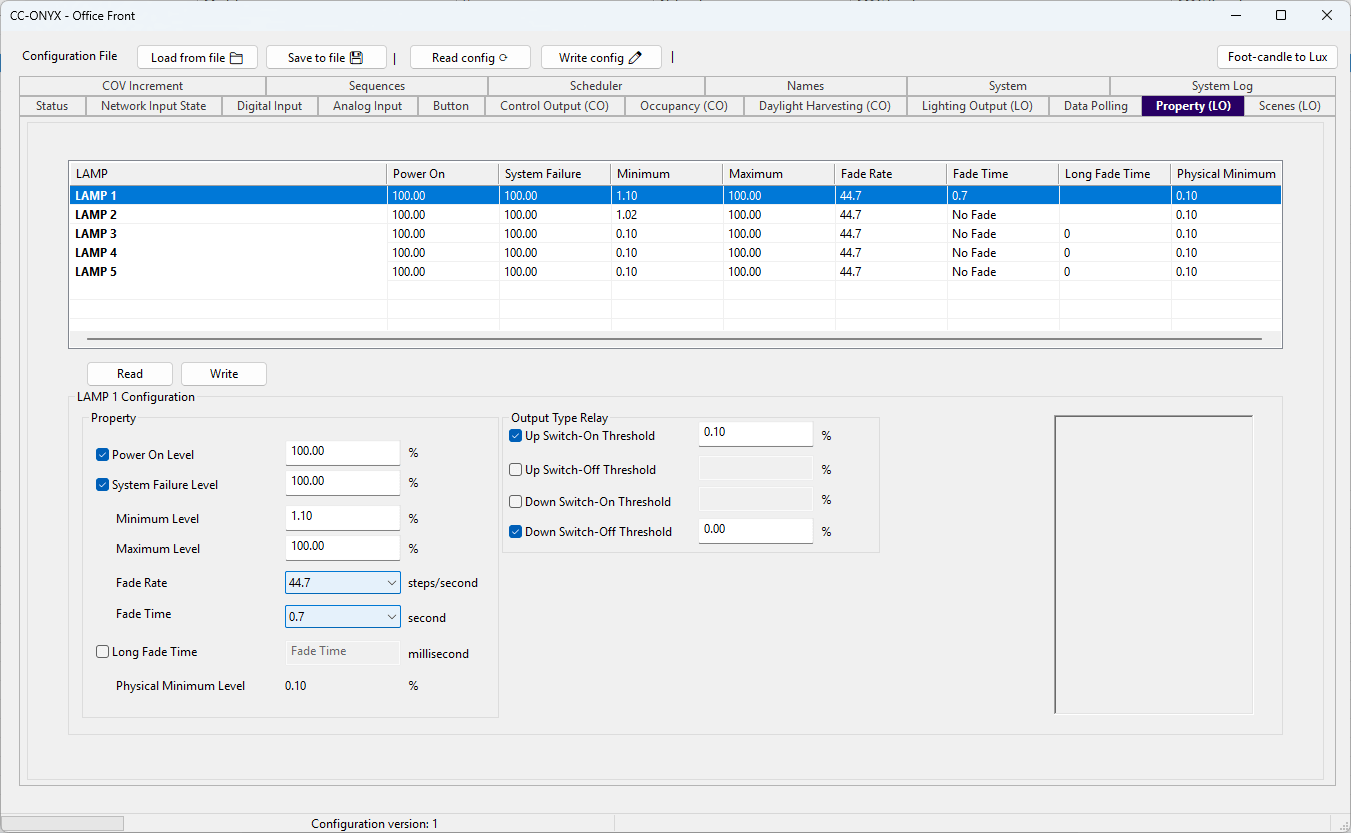
The Property tab configures the dimming properties of the light outputs. These properties map to the DALI variables of each output and also apply to the 0-10V and relay outputs. The list at the top shows every light output with its current settings. Select a row to edit it in the LAMP Configuration panel below.
Property list
| Column | Description |
|---|---|
| LAMP | Name of the light output. |
| Power On | Level the output goes to when the device powers on, in percent. |
| System Failure | Level the output goes to on a system failure, in percent. |
| Minimum | Minimum dimming level, in percent. |
| Maximum | Maximum dimming level, in percent. |
| Fade Rate | Dimming rate applied when fading, in steps per second. |
| Fade Time | Duration of a fade, in seconds. No Fade disables fading. |
| Long Fade Time | Extended fade time, in milliseconds. Used instead of Fade Time when enabled. |
| Physical Minimum | Lowest level the driver can physically reach, in percent. |
Configuration
Property
| Field | Description |
|---|---|
| Power On Level | Level the output goes to when the device powers on, in percent. |
| System Failure Level | Level the output goes to when a system failure occurs, in percent. |
| Minimum Level | Minimum dimming level, in percent. |
| Maximum Level | Maximum dimming level, in percent. |
| Fade Rate | Dimming rate applied when fading, in steps per second. |
| Fade Time | Duration of a fade, in seconds. No Fade disables fading. |
| Long Fade Time | When checked, an extended fade time entered in milliseconds is used instead of Fade Time. |
| Physical Minimum Level | Lowest level the driver can physically reach, in percent. |
Output Type Relay
These thresholds define when the relay switches ON or OFF relative to the dimming level.
Click Read to read the properties of every output from the device and refresh the values shown.
Click Write to write the modified properties to the device.