Scheduler
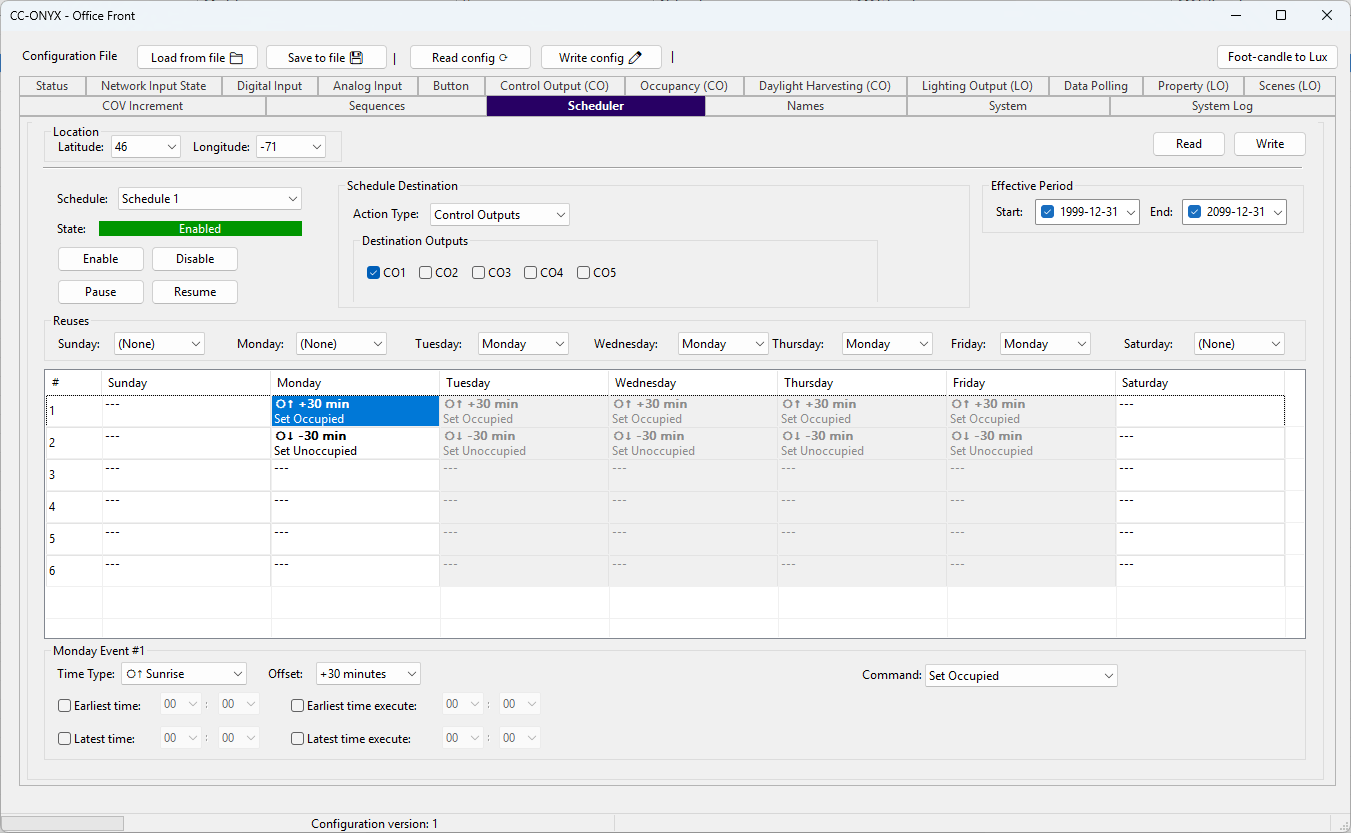
Select a schedule at the top, then click a grid cell to edit that event below.
Location
| Field | Description |
|---|---|
| Latitude | Site latitude, -90 to 90 degrees. Used to compute sunrise and sunset times for astronomical events. |
| Longitude | Site longitude, -180 to 180 degrees. Used with the latitude to compute sunrise and sunset times. |
The location is shared by all 5 schedules.
Schedule selection and state
| Control | Description |
|---|---|
| Schedule | Selects the schedule to view and edit. |
| State | Live runtime state read from the device: Enabled (green), Disabled (red), Paused (orange), or Unknown. |
| Enable | Turns the selected schedule on. Saved to the device. |
| Disable | Turns the selected schedule off. Saved to the device. |
| Pause | Temporarily suspends the selected schedule. Cleared on reboot. |
| Resume | Resumes a paused schedule. Cleared on reboot. |
Schedule Destination
Every event in the schedule acts on the same destination.
| Field | Description |
|---|---|
| Action Type | Module the schedule targets. |
| Destination | Target within the selected action type. |
Effective Period
| Field | Description |
|---|---|
| Start | First date the schedule is active. |
| End | Last date the schedule is active. |
The schedule runs only between the Start and End dates.
Reuses
The Reuses row holds one dropdown per day (Sunday to Saturday). Set a day to reuse another day instead of defining its own events. A reused day is grayed in the grid and cannot be edited. Select (None) for a day to use its own events.
Weekly grid
Each cell shows two lines:
| Line | Content |
|---|---|
| Top | The event time: a clock time (HH:MM), or Sunrise / Sunset. |
| Bottom | The command and value applied to the schedule destination. |
Click a cell to load it into the event editor below. Cells in a reused column are grayed and read-only.
Event editor
Selecting an editable cell opens the event editor for that day and event.
Type
| Type | Description |
|---|---|
| Disabled | The event does nothing. |
| Time | The event fires at a fixed clock time. |
| Sunrise | The event fires at the calculated sunrise. |
| Sunset | The event fires at the calculated sunset. |
For Sunrise and Sunset, the following fields apply:
| Field | Description |
|---|---|
| Offset | Minutes before or after the calculated sunrise or sunset, -120 to +120. |
| Earliest time | Optional lower window bound. When the event time is before this time, it is skipped. Check the box to enable it, then set HH:MM. When unchecked, there is no lower bound. |
| Latest time | Optional upper window bound. When the event time is after this time, it is skipped. Check the box to enable it, then set HH:MM. When unchecked, there is no upper bound. |
| Earliest time execute | Optional lower clamp. When the event time is before this time, it is executed at this time instead. Check the box to enable it, then set HH:MM. When unchecked, there is no lower clamp. |
| Latest time execute | Optional upper clamp. When the event time is after this time, it is executed at this time instead. Check the box to enable it, then set HH:MM. When unchecked, there is no upper clamp. |
Action
The action sets the command and value for this event, applied to the schedule destination. The available commands depend on the destination type.
Read and Write
Use Read to load the current scheduler configuration from the device, and Write to send the edited configuration back to the device.