Button
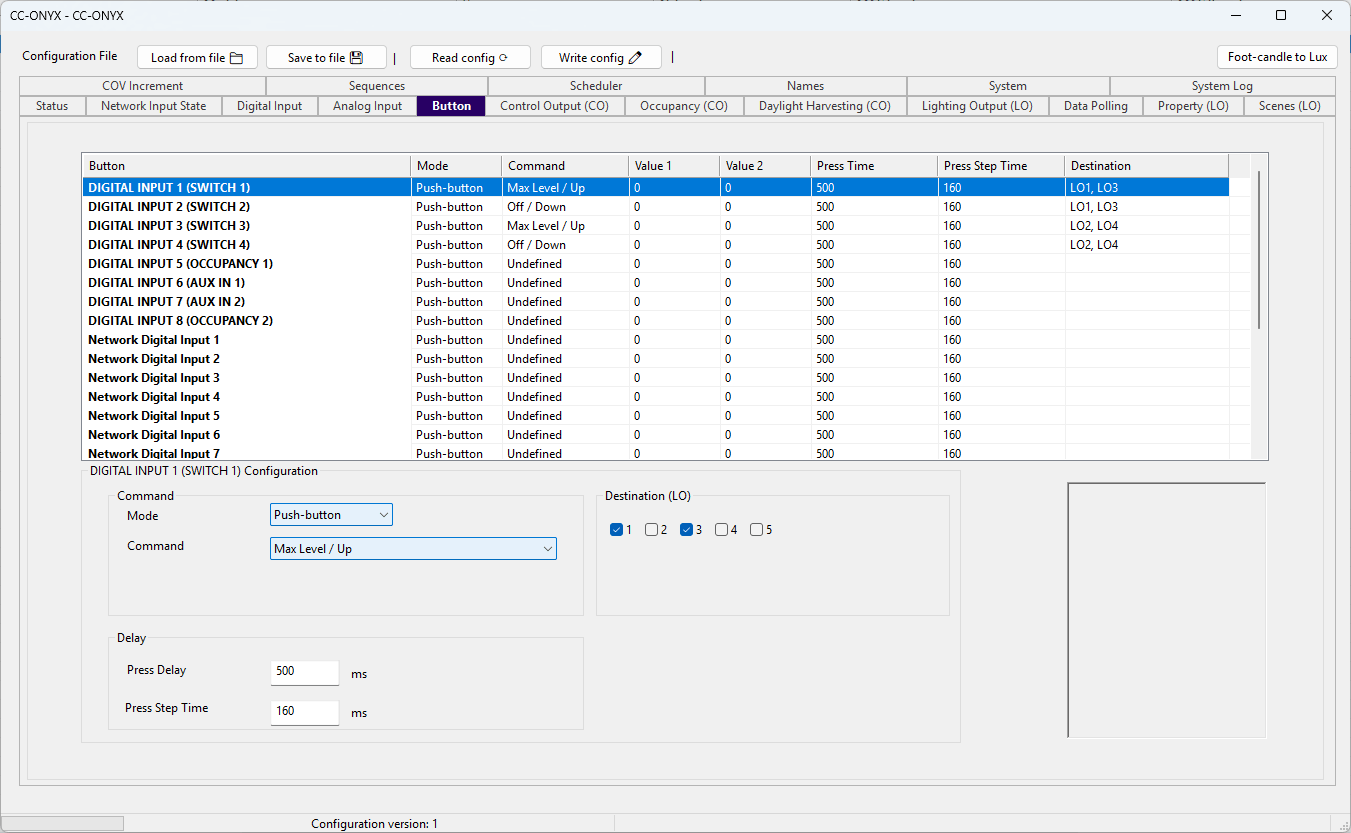
The Button tab defines the action each input performs on the lighting outputs. Every physical digital input and network digital input can trigger a command such as turning an output on, dimming it, recalling a scene, or controlling a sequence. The list at the top shows every input with its current action. Select a row to edit it in the Configuration panel below.
Button list
| Column | Description |
|---|---|
| Button | Name of the input. Inputs 1 to 8 are the physical digital inputs. Network Digital Input 1 to Network Digital Input 16 are the BACnet network inputs. |
| Mode | The mode of the input. Push-button for momentary contact, like a wall push button. Switch for maintained contact, like an occupancy sensor or a photocell. |
| Command | Action performed when the input is triggered. |
| Value 1 | First parameter of the command. Meaning depends on the command. Empty when the command has no parameter. |
| Value 2 | Second parameter of the command, used only by commands that need two values. |
| Press Time | Debounce delay applied to the input, in milliseconds. |
| Press Step Time | Interval between repeats of the command while a long press is held, in milliseconds. |
| Destination | Lighting outputs (LO1 to LO5) driven by the command. For sequence commands this column shows the sequence index instead. |
Configuration
Edit the selected input with the fields in the Configuration panel. Fields appear or disappear depending on the selected command.
Command
| Field | Description |
|---|---|
| Mode | Push-button treats the input as a momentary press, like a wall push button. Switch treats the input as a maintained on/off state, like an occupancy sensor or a photocell, and restricts the command list to toggle commands. |
| Command | The action performed on the destination outputs. See Commands below. |
| Value | Command parameter. For direct and modulo commands it is a percentage level (0 to 100). For scene commands it is the target scene. For sequence commands it is the sequence to control. The field is hidden when the command takes no parameter. |
| Value 2 | Second command parameter, shown only for commands that use two values (for example the direct value toggle and the scene modulo commands). |
Delay
| Field | Description |
|---|---|
| Press Delay | How long the input must remain stable before the controller accepts a state change (debounce), in milliseconds. |
| Press Step Time | Time between successive resends of the command while a long press is held, in milliseconds. Used by commands that ramp or step while the button stays pressed. |
Destination (LO)
Check each lighting output (LO1 to LO5) that the command should drive. Any combination can be selected.
Commands
Push-button mode exposes the full command set. Switch mode is limited to the toggle commands.
| Command | Description |
|---|---|
| Undefined | No action. The input is ignored. |
| Direct Value | Short press sets the output to the percentage given in Value. |
| Last Level | Short press recalls the last active level. |
| Max Level / Up | Short press goes to max level, long press ramps up. |
| Last Level / Up | Short press recalls the last level, long press ramps up. |
| Off / Down | Short press turns off, long press ramps down. |
| Recall Max Level | Short press sets the output to its maximum level. |
| Recall Min Level | Short press sets the output to its minimum level. |
| Off | Short press turns the output off. |
| Go To Scene | Short press recalls the scene given in Value. |
| Go To Scene / Up | Short press recalls the scene, long press ramps up. |
| Go To Scene / Down | Short press recalls the scene, long press ramps down. |
| Go To Scene / On And Step Up | Short press recalls the scene, long press turns on and steps up. |
| Go To Scene / Step Down And Off | Short press recalls the scene, long press steps down then off. |
| Modulo Up / Up | Short press steps up by the modulo value, long press ramps up. |
| Modulo Down / Down | Short press steps down by the modulo value, long press ramps down. |
| Max Level / Off (toggle) | Toggle between max level and off. |
| Last Level / Off (toggle) | Toggle between the last level and off. |
| Max Level - Up / Off - Down (toggle) | Toggle: max level with ramp up, or off with ramp down. |
| Last Level - Up / Off - Down (toggle) | Toggle: last level with ramp up, or off with ramp down. |
| Direct Value (toggle) | Toggle between the levels given in Value and Value 2. |
| Go To Scene (toggle) | Toggle between the scenes given in Value and Value 2. |
| Sequence Start | Start the sequence given in Value. |
| Sequence Stop | Stop the sequence given in Value. |
| Sequence Pause | Pause the sequence given in Value. |
| Sequence Resume | Resume the sequence given in Value. |
| Sequence Start/Stop (toggle) | Toggle the sequence given in Value between running and stopped. |
| Modulo Up / Modulo Up | Short press steps up by the modulo value, long press repeats the step. |
| Modulo Down / Modulo Down | Short press steps down by the modulo value, long press repeats the step. |
| Max Level / Modulo Up | Short press goes to max level, long press repeats a modulo step up. |
| Last Level / Modulo Up | Short press recalls the last level, long press repeats a modulo step up. |
| Off / Modulo Down | Short press turns off, long press repeats a modulo step down. |
| Max Level - Modulo Up / Off - Modulo Down (toggle) | Toggle with modulo stepping on long press. |
| Last Level - Modulo Up / Off - Modulo Down (toggle) | Toggle with modulo stepping on long press. |
| Go To Scene / Modulo Up | Short press recalls the scene, long press repeats a modulo step up. |
| Go To Scene / Modulo Down | Short press recalls the scene, long press repeats a modulo step down. |