Occupancy (CO)
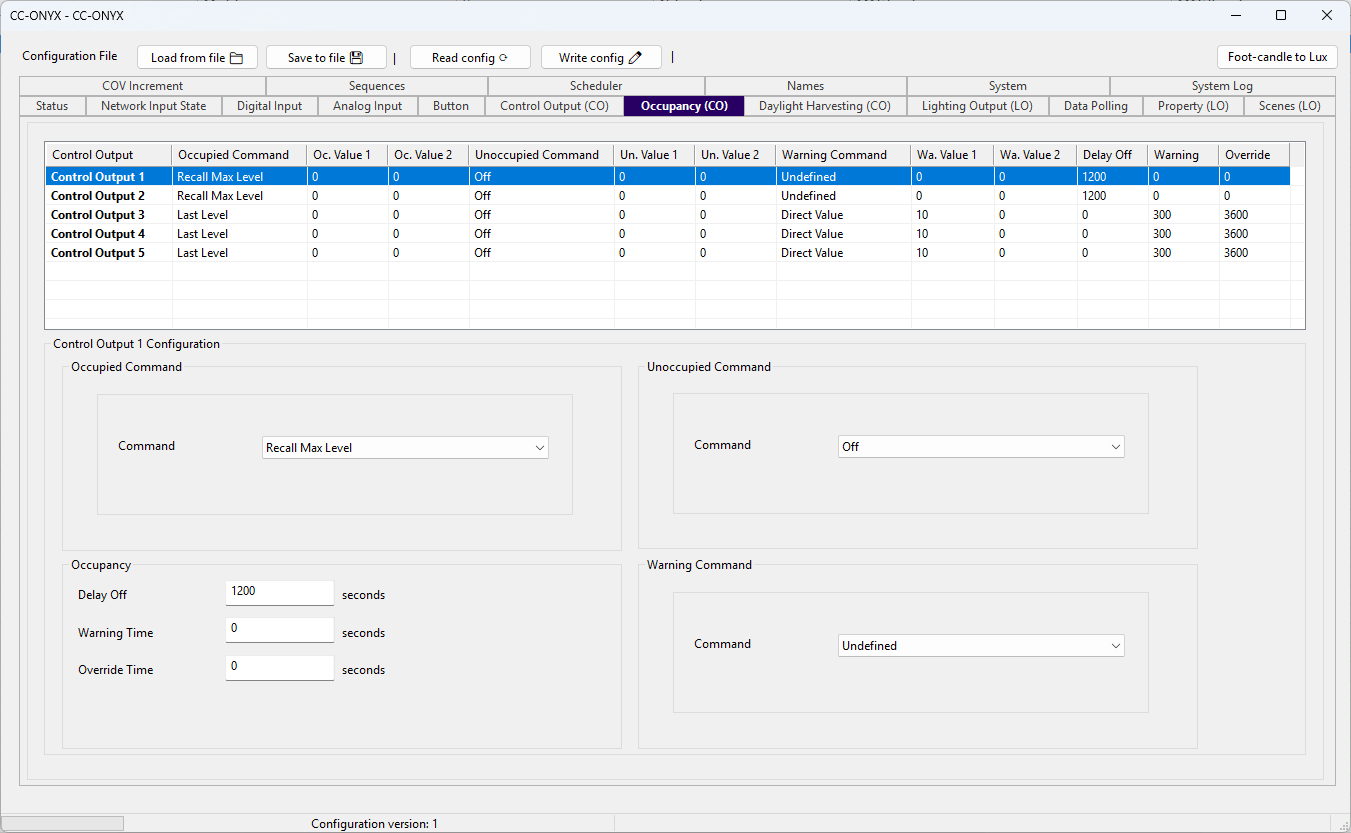
The Occupancy tab defines how each control output reacts to occupancy state. For every control output you set the command applied when the space becomes occupied, when it becomes unoccupied, and when a warning is issued before turning off, along with the delays and timers that drive the transitions. The list at the top shows every control output with its current settings. Select a row to edit it in the Configuration panel below.
Occupancy list
| Column | Description |
|---|---|
| Control Output | Name of the control output (Control Output 1 to Control Output 5). |
| Occupied Command | Command applied when the space becomes occupied. |
| Oc. Value 1 | First parameter of the occupied command. |
| Oc. Value 2 | Second parameter of the occupied command, used only by commands that need two values. |
| Unoccupied Command | Command applied when the space becomes unoccupied. |
| Un. Value 1 | First parameter of the unoccupied command. |
| Un. Value 2 | Second parameter of the unoccupied command, used only by commands that need two values. |
| Warning Command | Command applied when the warning is issued before the space goes unoccupied. |
| Wa. Value 1 | First parameter of the warning command. |
| Wa. Value 2 | Second parameter of the warning command, used only by commands that need two values. |
| Delay Off | Time the space stays occupied after the last detected activity, in seconds. |
| Warning | Duration of the warning phase that runs after the delay off expires, in seconds. During this phase the warning command is applied, then the unoccupied command runs when it ends. 0 disables the warning phase and runs the unoccupied command immediately. |
| Override | Duration of a manual override before occupancy control resumes and the warning and unoccupied commands are allowed to re-execute, in seconds. |
Configuration
Edit the selected control output with the fields in the Configuration panel.
Occupied Command
| Field | Description |
|---|---|
| Command | Action applied when the space becomes occupied. See Commands below. |
| Value | Command parameter, shown only for commands that use it. |
| Value 2 | Second command parameter, shown only for commands that use two values, such as the scene toggle. |
Unoccupied Command
| Field | Description |
|---|---|
| Command | Action applied when the space becomes unoccupied. See Commands below. |
| Value | Command parameter, shown only for commands that use it. |
| Value 2 | Second command parameter, shown only for commands that use two values. |
Warning Command
| Field | Description |
|---|---|
| Command | Action applied when the warning is issued before the space goes unoccupied. See Commands below. |
| Value | Command parameter, shown only for commands that use it. |
| Value 2 | Second command parameter, shown only for commands that use two values. |
Occupancy
| Field | Description |
|---|---|
| Delay Off | Time the space stays occupied after the last detected activity, in seconds. |
| Warning Time | Duration of the warning phase after the delay off expires, in seconds. At the beginning of this phase the warning command is executed, then the unoccupied command is executed at the end of this delay. Set to 0 to skip the warning phase and execute the unoccupied command immediately. |
| Override Time | Duration of a manual override before occupancy control resumes and the warning and unoccupied commands are allowed to re-execute, in seconds. |
Commands
Toggle commands are evaluated against the live lighting state. For example an occupied Max Level / Off (toggle) turns the outputs on when they are off, but if they are already on it turns them off. Because the decision depends on the current light level, non-toggle commands such as Recall Max Level or Off give more predictable occupancy behavior.
| Command | Description |
|---|---|
| Undefined | No action. The state is ignored. |
| Direct Value | Sets the output to the percentage given in Value. |
| Last Level | Recalls the last active level. |
| Max Level / Up | Goes to max level. |
| Last Level / Up | Recalls the last level. |
| Off / Down | Turns the output off. |
| Recall Max Level | Sets the output to its maximum level. |
| Recall Min Level | Sets the output to its minimum level. |
| Off | Turns the output off. |
| Go To Scene | Recalls the scene given in Value. |
| Go To Scene / Up | Recalls the scene given in Value. |
| Go To Scene / Down | Recalls the scene given in Value. |
| Go To Scene / On And Step Up | Recalls the scene given in Value. |
| Go To Scene / Step Down And Off | Recalls the scene given in Value. |
| Modulo Up / Up | Steps up by the modulo value given in Value. |
| Modulo Down / Down | Steps down by the modulo value given in Value. |
| Max Level / Off (toggle) | Toggle between max level and off. |
| Last Level / Off (toggle) | Toggle between the last level and off. |
| Max Level - Up / Off - Down (toggle) | Toggle between max level and off. |
| Last Level - Up / Off - Down (toggle) | Toggle between the last level and off. |
| Direct Value (toggle) | Toggle between the levels given in Value and Value 2. |
| Go To Scene (toggle) | Toggle between the scenes given in Value and Value 2. |
| Sequence Start | Start the sequence given in Value. |
| Sequence Stop | Stop the sequence given in Value. |
| Sequence Pause | Pause the sequence given in Value. |
| Sequence Resume | Resume the sequence given in Value. |
| Sequence Start/Stop (toggle) | Toggle the sequence given in Value between running and stopped. |
| Modulo Up / Modulo Up | Steps up by the modulo value given in Value. |
| Modulo Down / Modulo Down | Steps down by the modulo value given in Value. |
| Max Level / Modulo Up | Goes to max level. |
| Last Level / Modulo Up | Recalls the last level. |
| Off / Modulo Down | Turns the output off. |
| Max Level - Modulo Up / Off - Modulo Down (toggle) | Toggle between max level and off. |
| Last Level - Modulo Up / Off - Modulo Down (toggle) | Toggle between the last level and off. |
| Go To Scene / Modulo Up | Recalls the scene given in Value. |
| Go To Scene / Modulo Down | Recalls the scene given in Value. |