Sequences
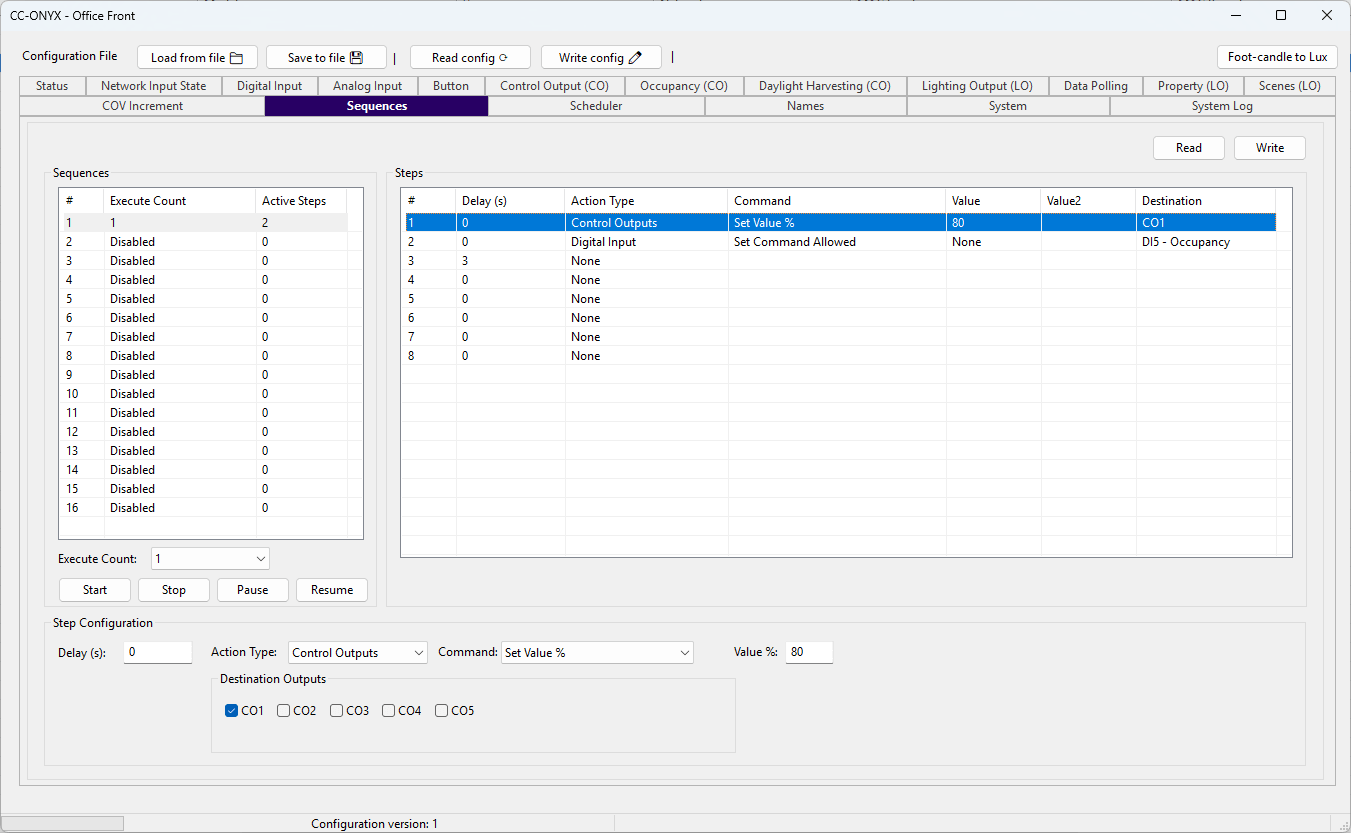
The Sequences tab defines automated action sequences that the device can run. There are 16 sequences, each holding up to 8 steps. Select a sequence in the top list, then select a step to edit its action in the panels below.
Sequence list
| Column | Description |
|---|---|
| # | Sequence number, 1 to 16. |
| Execute Count | How many times the sequence runs when started (Disabled, 1 to 254, or Infinite). |
| Active Steps | Number of steps that carry an action in this sequence. |
Sequence configuration
| Field | Description |
|---|---|
| Execute Count | How many times the whole sequence repeats when started. Disabled turns the sequence off, 1 to 254 runs it a fixed number of times, and Infinite loops until stopped. |
Step list
Each selected sequence shows its 8 steps. Select a step to edit it below.
| Column | Description |
|---|---|
| # | Step number. |
| Delay (s) | Seconds to wait before the step runs, 0 to 65535. 0 runs immediately. |
| Action Type | Subsystem the step targets (see the action types below). |
| Command | Action performed on the target. |
| Value | Command parameter, when the command uses one. |
| Value2 | Secondary parameter. |
| Destination | Target of the action (light outputs, control outputs, a sequence, a digital input, a network digital input, or a schedule). |
Step configuration
Delay
Seconds to wait before the step runs, 0 to 65535. A step with a delay of 0 runs immediately after the previous step.
Action
The action editor sets what the step does. The available Command, Value, and Destination fields change with the selected Action Type.
| Action Type | Description |
|---|---|
| None | The step is empty and does nothing. |
| Lighting Output | Acts on one or more light outputs (LO1 to LO5). Commands: Set Value %, Recall Scene. |
| Control Outputs | Acts on one or more control outputs (CO1 to CO5). Commands: Set Occupied, Set Unoccupied, Set Value %, Recall Scene, Daylight Start, Daylight Stop, Set Power Limit %, Set Override Time, Set Sensor Allowed. |
| Sequence | Controls another sequence chosen in the destination. Commands: Start, Stop, Pause, Resume. |
| Sequence (Any) | Same commands as Sequence, but the target sequence is taken from the Value field instead of a fixed destination. |
| Digital Input | Sets whether a digital input is allowed to issue commands. The destination is one of the 8 physical inputs or 6 local buttons. Command: Set Command Allowed. |
| Network Digital Input | Sets whether a network digital input (Network DI 1 to Network DI 16) is allowed to issue commands. Command: Set Command Allowed. |
| Schedule | Controls a schedule chosen in the destination. Commands: Enable, Disable, Pause, Resume. Enable and Disable are saved to the device. Pause and Resume are temporary and cleared on reboot. |
Manual control
The buttons at the bottom run the selected sequence on the device.
| Button | Action |
|---|---|
| Start | Runs the selected sequence from its first step. |
| Stop | Stops the selected sequence. |
| Pause | Pauses the selected sequence at its current step. |
| Resume | Resumes a paused sequence. |
Read and Write
Use Read to load the current sequence configuration from the device, and Write to send the edited configuration back to the device.