RS-485 Network Installation
Reference guide for an RS-485 network installation.
Introduction
This guide contains RS-485 network installation recommendations. RS-485 network installation can be tricky. In case of doubt, use the services of a network specialist.
Cabling rules
Maximal cable length
The maximum length of a network is based on its communication speed and the number of devices. The longer the segment becomes, the slower the speed will be. Using the proper cable and installation, the maximum recommended length of an RS-485 network will be about 1200 m (4000 feet). See the curve below.

Fig. 1 - Speed vs network length. (Source: The Art and Science of RS-485 - circuitcellar.com)
Some network cable models identify the cable length on the jacket (sheath). It is recommended to note the lengths of cable on the plan, which can be useful information when problems occur.
Cable type
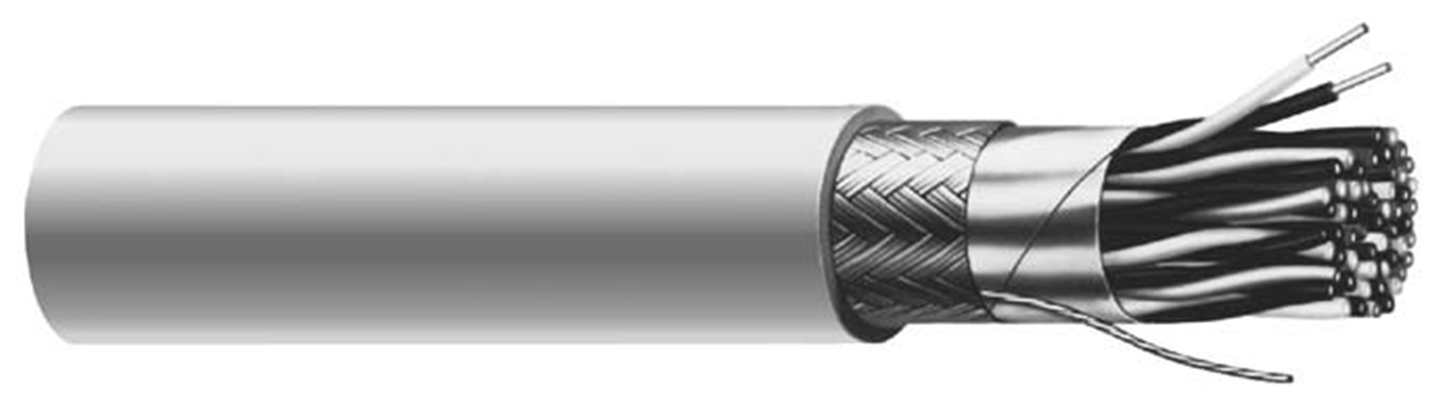
Cristal Controls recommends the use of EIA RS-485 cable 22-24 AWG, twisted and balanced, with an impedance of 100-130 ohms, a capacitance below 100 pF per meter (30 pF per foot), and a braided shield. Compared to the foil shield, the braided shield offers better protection against electromagnetic interference, especially for high frequencies.
The table below shows a few suggested cables meeting these specifications.
Recommended cables
| Look | Manufacturer | Model (1 pair) | Model (2 pairs) | AWG |
|---|---|---|---|---|
 | Belden | 9841 | 9842 | 24 |
 | Belden | 82841 | 82842 | 24 |
 | Belden | 89841 | 89842 | 24 |
 | Belden | 3105A | 3107A | 22 |
 | Belden | 3106A (1 pair + 1) | 22 | |
 | Cerco Cable | 8250 | 8251 | 24 |
 | Alpha Wire | 6412 | 6413 | 24 |
 | General Cable | C0841A | C0842A | 24 |
| General Cable | C4841A | C4842A | 24 |
Network characteristic
The RS-485 network may have up to 32 unit loads. When more than 32 controllers are needed on the same RS-485 network, routers or repeaters need to be added as recommended.
The network requires two 120-Ω termination resistors connected in parallel with, or behind, the last device at each end of the network segment. The termination resistors reduce signal reflections which may cause misinterpretation of logic levels by receivers.
One end of the network also requires two bias resistors of 604-Ω. The bias resistors force a neutral state on the network and avoid false start bits when no device is transmitting on the RS-485.
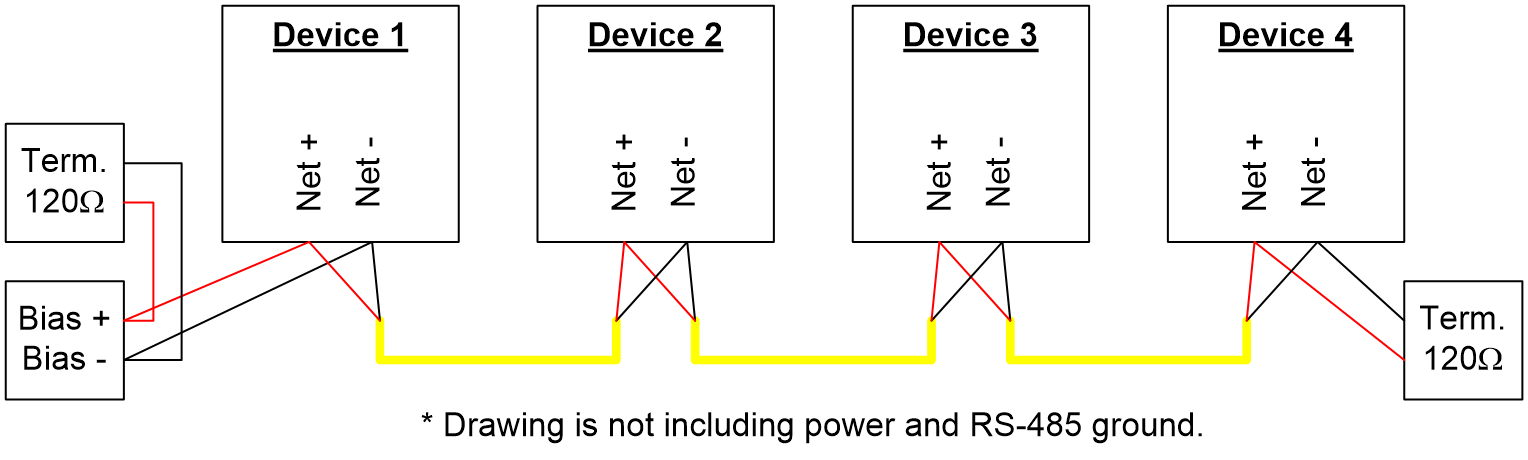
Fig. 2 - RS-485 polarization and end of line resistor.
The polarity of an RS-485 network is important. The positive network and the negative network must be connected to the corresponding terminals on the other components.
On some components, it is possible to activate a termination resistor or bias resistors by installing jumpers. Refer to the documentation of those products to enable them. If the products you use do not offer the on-board possibility, external components can be added for the same result.
Network third wire
An RS-485 network also requires the presence of a third wire to keep the communication channels at the same reference, so the communication remains stable at all times. Without the third wire, potential differences can occur between components, which can cause loss of communication or even damage the communication circuits.
On all Cristal Controls products, the RS-485 circuit is not isolated from the other electronic components of the device. So the supply terminal N24 is the reference power for communication.
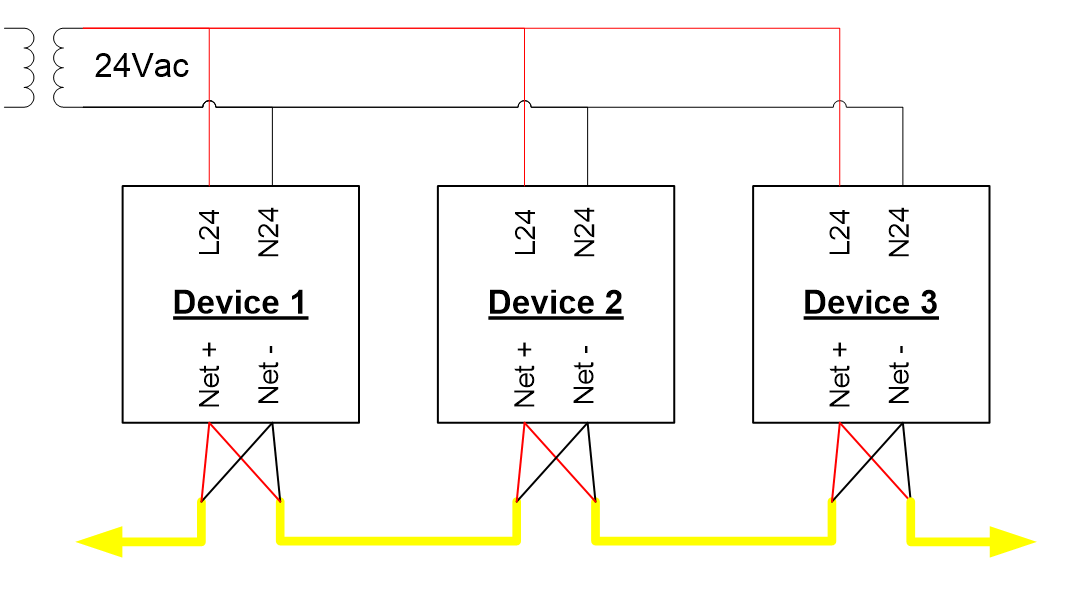
Fig. 3 - RS-485 with a common supply.
A third wire must be used for devices with multiple power sources in order to have the same reference.
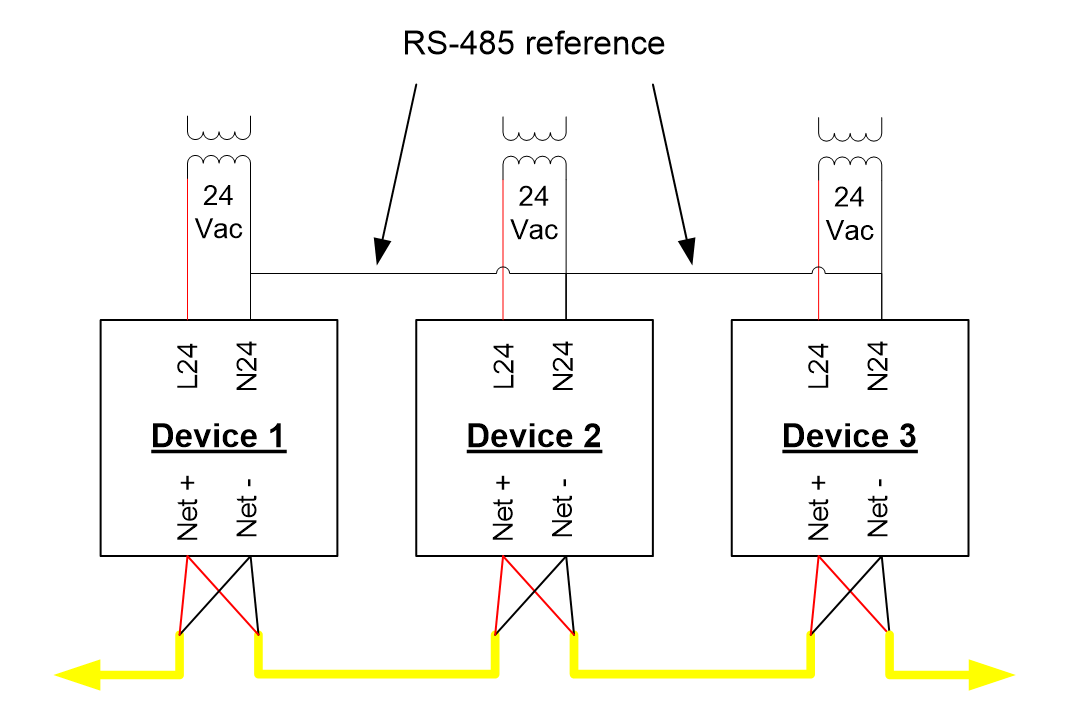
Fig. 4 - RS-485 with multiple N supply.
On a network with an isolated communication circuit, a third wire must be used to have a common communication reference.
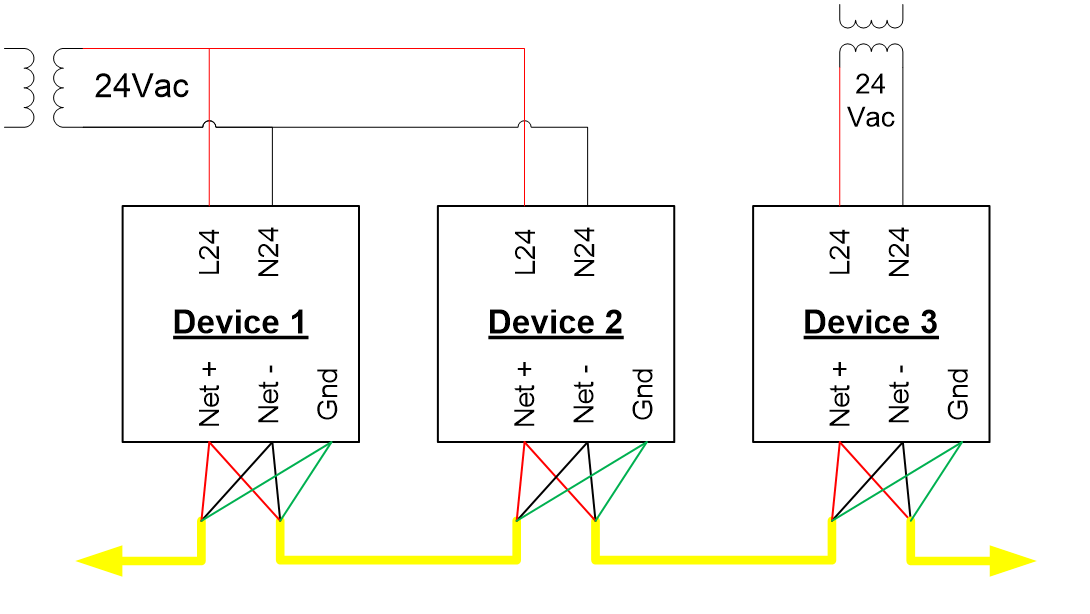
Fig. 5 - RS-485 network with isolated communication.
Although the RS-485 communication may seem to work well with only 2 wires, it is risky not to properly install the third wire. Once the products are installed, potential differences can be created over time and make communication ineffective or intermittent. Costs related to network diagnosis or addition of the third wire will be much higher than providing the third wire at the time of installation.
Install a 4-conductor wire, use a pair for communication and the other pair to connect your references. Connect the unused conductors to earth ground at both ends to prevent them from becoming a disruptive antenna.
Wire stripping and metal shield
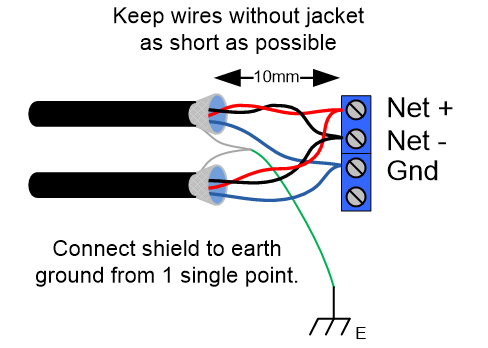
Fig. 6 - Stripping and shield.
Keep the stripping at terminal connections as minimal as possible (10 mm or ½ inch). At the connector level, no wire copper should be visible.
Connect together all the wires related to the metal shielding and make the ground connection at one place on the network.
Attention and care at the connection level can make the difference between an impeccable network and an unreliable, or even non-functional, one.
Network installation and testing
Here are some known RS-485 network problems:
- Reversed polarity.
- Weak connections and too small a contact surface between the conductors.
- Wires are no longer twisted or protected by their shield over a long length.
- Wires are short-circuited between them or with the ground.
- Excessive electrical noise due to the proximity of power cables or noisy equipment.
- The design of the RS-485 network is not balanced.
- The signals are reflected due to end-of-line misconfigurations.
- The network is deployed in a star or with long legs in the shape of a "T".
Most of these problems can be avoided by carefully pre-designing the network before installation.
Here are several tests that can be done in case of problems after installing the network wire and power supply. The earlier these tests are done, the easier the problems will be to identify and correct. Most tests cannot be done once the equipment is installed and powered.
Recommended installation
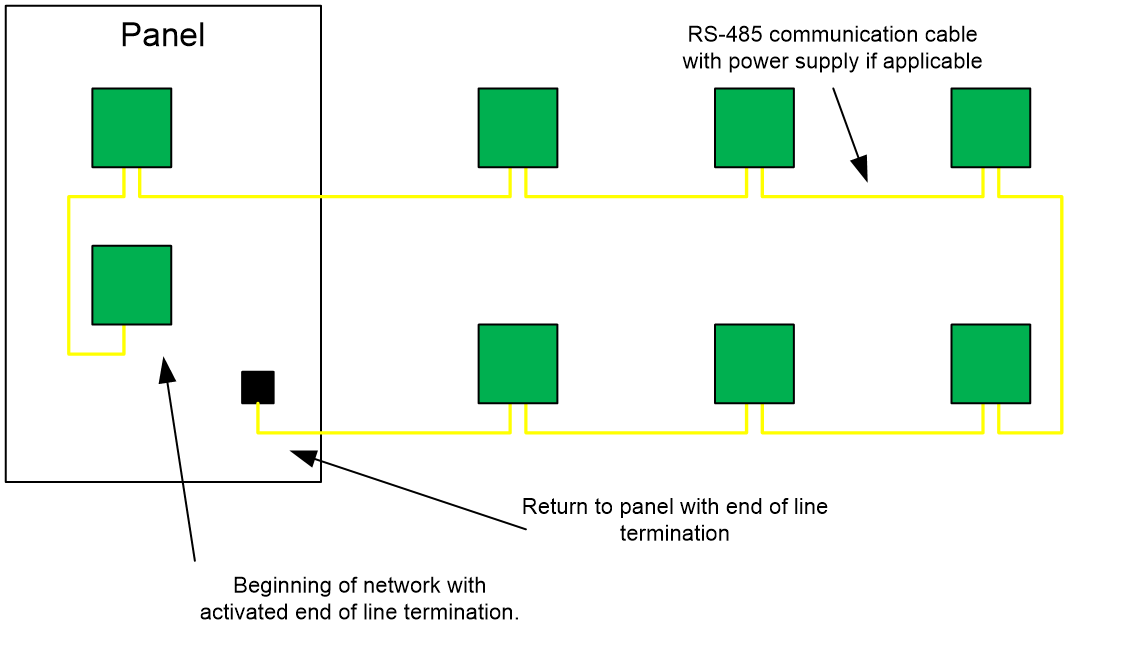
Fig. 7 - Recommended network.
All RS-485 devices should be on the same recommended 32-device network. Ideally, power should follow the same path as the network if both are coming from the same point. We suggest returning the network and power to the starting point. The extra length used to go back to the starting point will be used to test the network (see End to end test).
If you are using marked cable, you will know the exact length of your network. Finally, a defective network can be very easy to repair with this extra wire. Look at the following picture.
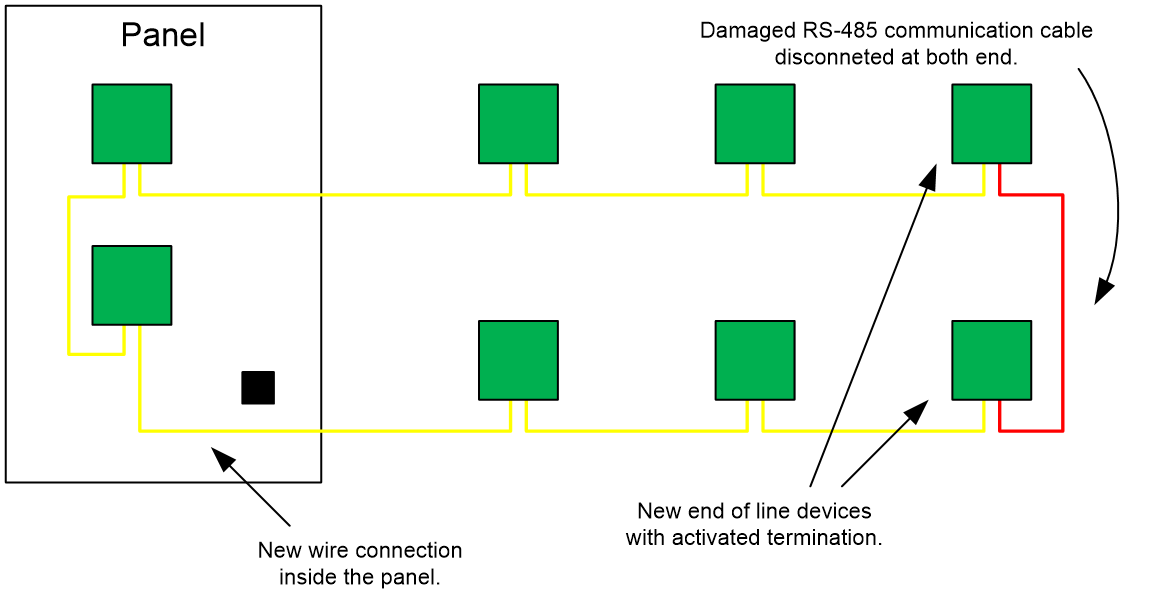
Fig. 8 - Network reorganized.
It is desirable to keep the data signal cables separated from power cables. Data cable should always be kept at a distance of 5x the radius of a power cable so it will not be influenced by it. A cable with a strong current that is set to ON or OFF can induce a type of disturbance called "common mode noise".
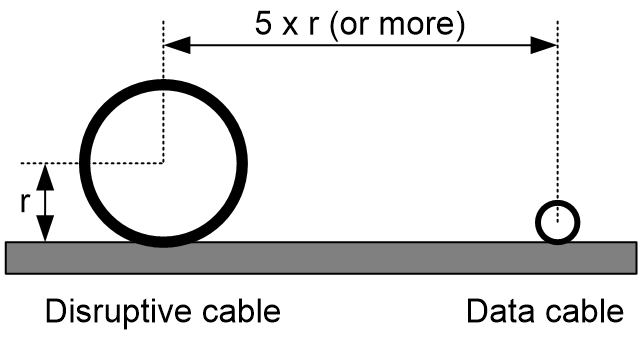
Fig. 9 - Length between cables.
Test with grounding
A test should be run between each conductor of your cable and the building earth ground. If a resistance value is read, all wire connections should be inspected to repair the short circuit fault.
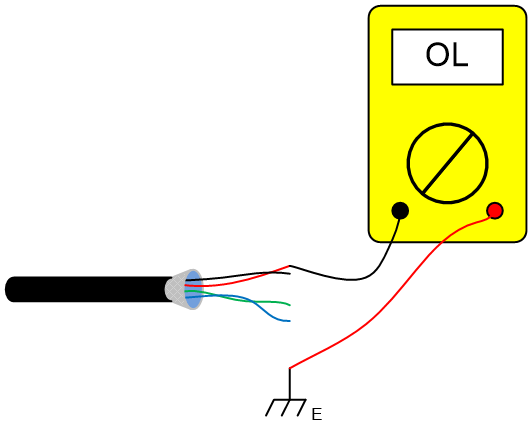
Be aware of devices that are connected. When testing a supply or network conductor, you may read a short circuit through the devices. In some cases, you are also testing equipment connected to them. So we suggest testing the cables at installation to reduce the time needed for investigation.
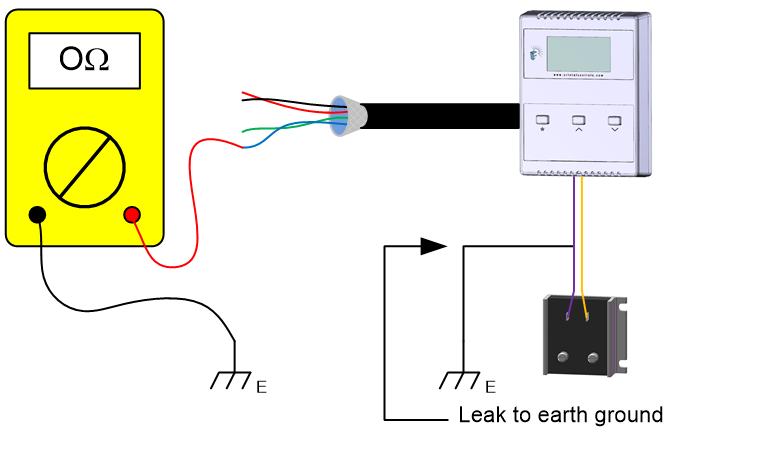
Test with metal shield
A test between each conductor of the cable and the metal shield should be done to make sure there is no conduction. If a resistance value is detected, all wire connections should be inspected and the short circuit fault fixed.
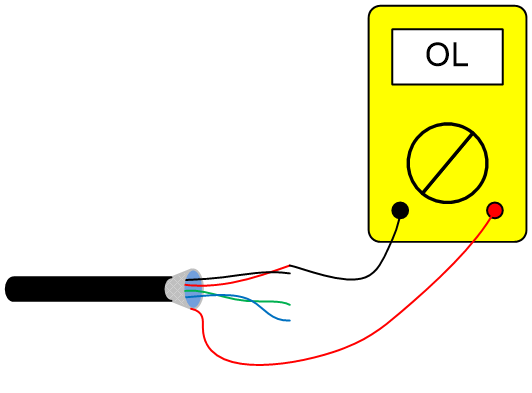
Test between wires
A test between each pair should be done to check conduction between them. On a 4-conductor cable there are 6 possible test scenarios. If a resistance value is detected, all wire connections should be inspected and the short circuit fault fixed.
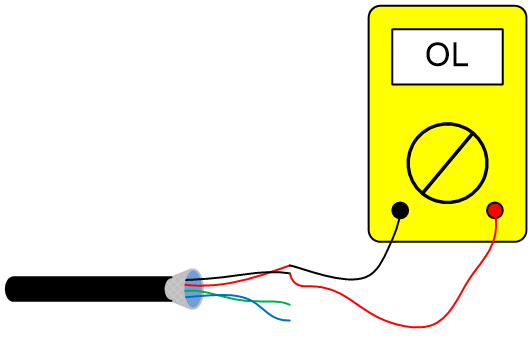
End to end test
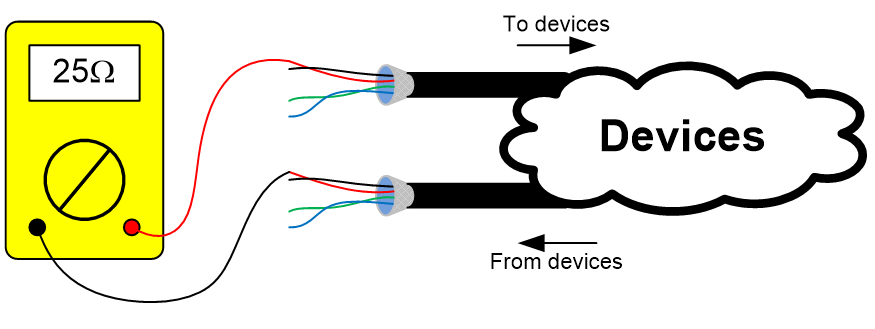
When your network makes a loop from the starting point to the end point (back to the same panel), make your end-to-end test at the panel level. You should read 15 to 30 Ω based on the network length and type of cable used. Repeat this test for each conductor and shield.
If you read a higher value, all network connections should be inspected and fixed where there is a weak contact.
If you read an open circuit, the cable needs to be tested in smaller sections in order to identify the weak section or connection.
If a cable section cannot be fixed, you can reconfigure the network. Discard the defective wire part, then join your two separate networks, both present in your electrical panel. Finally, reconfigure your terminating resistors properly (refer to Fig. 8 - Network reorganized).
Visual inspection
A visual inspection is suggested prior to powering the network. Check all color codes and make sure they all match from connection point to connection point. This step will prevent damage to devices on the network and prevent device operating failures.
If your 2 pairs of wires have the same color, proceed with a multimeter test to validate that the 2 pairs were not mixed.
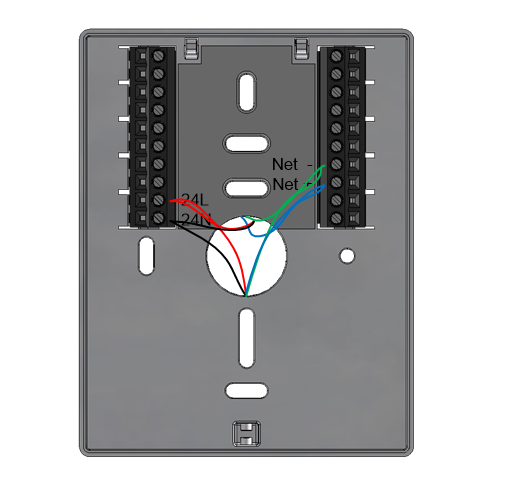
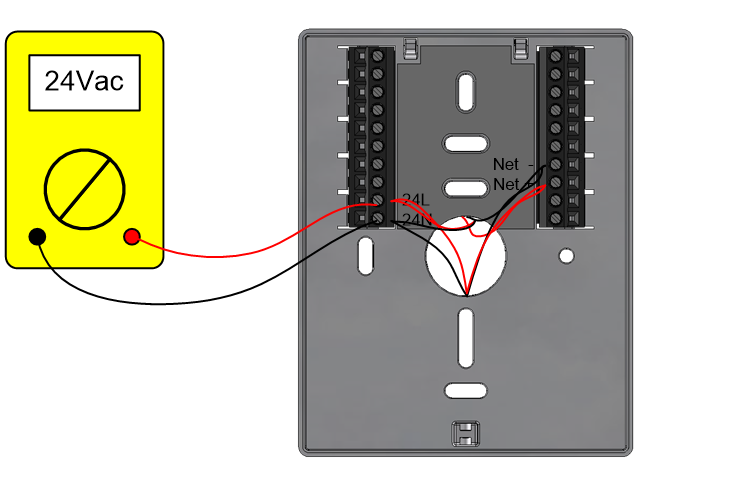
Example: if you have thermostat terminals on the network, you can test all terminals before installing the thermostats on their base. This can be done with any type of equipment.
Short circuit one of the pairs and check that the short circuit is on the proper terminal pair.
Network terminations test
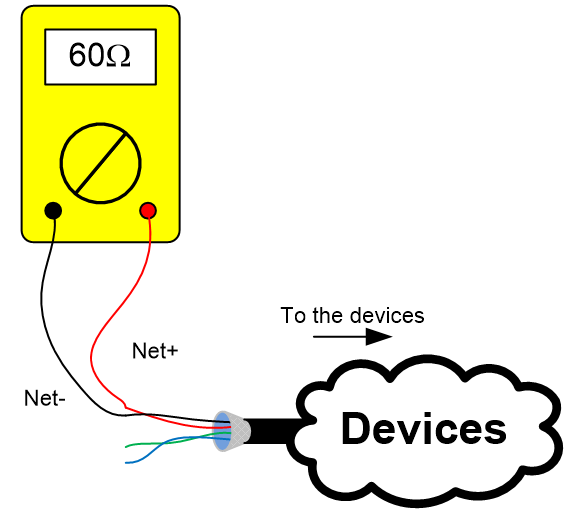
Once all devices are connected (at this point without power), verify the resistance between the 2 network conductors. You should read around 60 Ω.
A different reading may indicate that you have more or less than 2 terminating resistors installed. For example: 1 terminating resistor = 120 Ω, 3 terminating resistors = 40 Ω.
References
- Standard TIA-485A
- TSB-89-A - Application Guidelines for TIA/EIA-485-A
- BACnet ASHRAE Manual (ANSI/ASHRAE Standard 135-2008), Section 9.2, ISSN 1041-2336
- Practical Industrial Data Communications, Best Practice Techniques - IDC Technologies - 2005, ISBN 978-0-7506-6395-3
- Guide réseau MODBUS - Schneider Electric - Merlin Guerin - 2000
- Maxim Application Note 3884 - How Far and How Fast Can You Go with RS-485?
- Designing RS-485 Circuits - circuitcellar.com - Jan Axelson - June 1999
- The Art and Science of RS-485 - circuitcellar.com - Bob Perrin - July 1999
- RS-485 Bus - interfacebus.com
- RS485 Cables - Why you need 3 wires for 2-wire RS485 - Chipkin.com