Scenarios
Overview
The room controller can be configured quickly using the 8‑position SCENARIOS dipswitch or through the configuration software.
For a simple, straightforward setup, use the physical SCENARIOS dipswitch for fast configuration. If advanced customization is required, use the configuration software.
A scenario is a predefined combination of room control settings, including:
- How many rooms are controlled
- How long the lights remain ON after the room becomes vacant
- Whether lights turn ON automatically
- The light level used when the room becomes occupied
- The light level used when the room becomes unoccupied
- Whether daylight harvesting is enabled
- The behavior of the wall switches
Each of the eight SCENARIOS dipswitch positions controls one aspect of the room operation. Setting each position to ON or OFF creates a complete operational profile for the space.
Refer to the Scenario Details for a complete description of all inputs and outputs used by the scenarios.
How Scenarios Work
Each dipswitch position corresponds to a specific operational setting:
- Position 1 – Room type (one room or two rooms)
- Position 2 – Occupancy time delay
- Position 3 – Occupancy sensor mode
- Position 4 – Light level when occupied
- Position 5 – Light level when unoccupied
- Position 6 – Daylight harvesting
- Position 7 – Switch mode selection
- Position 8 – Switch mode selection
Together, these positions form a unique Scenario ID, for example: RT1-TDS-OSO-OCH-UCO-DL0-SM1.
This ID provides a concise representation of all selected operational behaviors.
Scenario Occupancy Event Flow Chart
This flow chart shows how the SCENARIOS manages lighting based on occupancy sensor events. It illustrates the decisions from sensor detection and daylight harvesting to the final light output level.
Factory Default Positions
By default, all positions are set to OFF.
This corresponds to the scenario: RT1-TDS-OSO-OCH-UCO-DL0-SM1.
In practical terms, this results in:
- One room
- 20‑minute occupancy timeout
- Lights turn ON automatically
- 100% light level when occupied
- Lights turn OFF when unoccupied
- No daylight harvesting
- Standard wall switch mode
This default configuration is suitable for most standard single‑room installations.
Using the Dipswitch
The SCENARIOS dipswitch contains eight positions. Each position controls a specific part of the room control behavior. Setting a position to ON or OFF immediately updates the room controller operation.
Position 1 – Room Type
Determines whether one or two rooms are controlled by the scenario.
When configured for two rooms, both rooms must require similar control behavior. Two‑room mode primarily affects the behavior and actions of the wall switches.
- OFF (
RT1): Controls one room - ON (
RT2): Controls two rooms
Position 2 – Occupancy Time Delay
Determines how long lights remain ON after the room becomes vacant.
After this delay, the UCO or UCM light level is applied.
- OFF (
TDS): Short delay – lights remain ON 20 minutes - ON (
TDL): Long delay – lights remain ON 40 minutes
Position 3 – Occupancy Sensor Mode
Determines whether lights turn ON automatically based on occupancy detected by the sensor.
- OFF (
OSO): Occupancy mode – lights turn ON (OCHorOCM) automatically when the room becomes occupied and turn OFF (UCOorUCM) automatically when vacant - ON (
OSV): Vacancy mode – lights must be turned ON manually but turn OFF (UCOorUCM) automatically when vacant
In vacancy mode (OSV), when the room becomes vacant, a 15‑second grace period begins. If the occupant returns during this period, lights are automatically restored to their previous level without requiring manual activation. Daylight harvesting is also restarted if it was active.
Position 4 – Occupied Light Level
Determines the light level when the room becomes occupied.
This applies when the occupancy sensor controls the lights (OSO) as the room becomes occupied.
- OFF (
OCH): High – 100% brightness when occupied, or maintain a 400 lux illuminance setpoint if daylight harvesting (DL1) is enabled - ON (
OCM): Medium – 50% brightness when occupied, or maintain a 250 lux illuminance setpoint if daylight harvesting (DL1) is enabled
Position 5 – Unoccupied Light Level
Determines the light level when the room becomes unoccupied.
This applies when the occupancy sensor controls the lights as the room becomes unoccupied.
- OFF (
UCO): Lights turn OFF when the room is unoccupied - ON (
UCM): Medium – 50% brightness when unoccupied
Position 6 – Daylight Harvesting
Determines whether daylight harvesting control is enabled.
- OFF (
DL0): Daylight harvesting is disabled - ON (
DL1): Lights adjust automatically based on natural daylight
Positions 7 and 8 – Switch Mode
Determines how the wall switches behave.
Select how wall switches control the room. Options depend on the number of buttons, the number of rooms, whether daylight harvesting is enabled, and the overall control scheme (see Scenarios Details for a complete description).
Scenarios Details
The predefined scenarios of operation are selectable via the 8-position dipswitches SCENARIOS or through the configuration software.
A complete SCENARIOS ID is formed by the different position ID selections, separated by dashes
(e.g., RT1-TDS-OSO-OCH-UCO-DL0-SM1).
The factory default positions for the dipswitch SCENARIOS are all OFF, corresponding to the ID RT1-TDS-OSO-OCH-UCO-DL0-SM1.
Dipswitch
The SCENARIOS dipswitch has eight positions and allows the selection of the different scenarios.
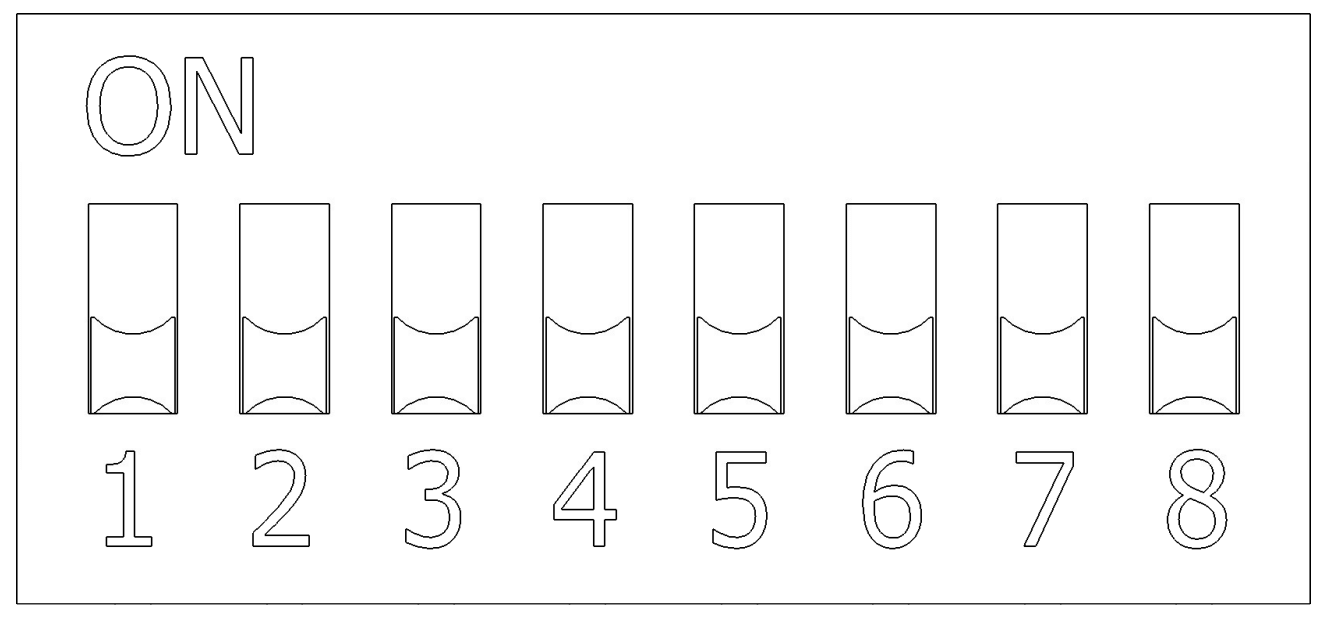
Positions ID
| Position | ID | Name | Value OFF | Value ON |
|---|---|---|---|---|
| 1 | RT | Room Type | RT1 — One room | RT2 — Two rooms |
| 2 | TD | Timing Delay | TDS — Short time delay | TDL — Long time delay |
| 3 | OS | Occupancy Sensor | OSO — Occupancy mode | OSV — Vacancy mode |
| 4 | OC | Occupied Command | OCH — Occupied high level | OCM — Occupied medium level |
| 5 | UC | Unoccupied Command | UCO — Unoccupied off level | UCM — Unoccupied medium level |
| 6 | DL | Daylight Harvesting | DL0 — Daylight harvesting is not available | DL1 — Daylight harvesting is available |
| 7, 8 | SM | Switch Mode | See SM details below | See SM details below |
RT - Room Type
| Position | Value | ID | Number | Description |
|---|---|---|---|---|
| 1 | OFF | RT1 | 0 | One room. |
| 1 | ON | RT2 | 1 | Two rooms. |
RT1 - One room
When this option is selected, it controls a single room with a single occupancy state and possibly a single daylight harvesting zone.
Room 1
- The occupancy input is named DI5 - OCCUPANCY 1 and QUICK CONNECT 1 (QC).
- The light level input is named AI1 - DAYLIGHT 1 and QUICK CONNECT 1 (QC).
- The wall-switch inputs are according to the selected
SMmode.
RT2 - Two rooms
When this option is selected, it controls two rooms, each with a single occupancy state and possibly a single daylight harvesting zone.
Room 1
- The occupancy input is named DI5 - OCCUPANCY 1 and QUICK CONNECT 1 (QC).
- The light level input is named AI1 - DAYLIGHT 1 and QUICK CONNECT 1 (QC).
- The wall-switch inputs are according to the selected
SMmode.
Room 2
- The occupancy input is named DI8 - OCCUPANCY 2.
- The light level input is named AI2 - DAYLIGHT 2.
- The wall-switch inputs are according to the selected
SMmode.
TD - Time Delay
| Position | Value | ID | Number | Description |
|---|---|---|---|---|
| 2 | OFF | TDS | 0 | Short time delays. The occupancy delay is configured to 20 minutes. |
| 2 | ON | TDL | 2 | Long time delays. The occupancy delay is configured to 40 minutes. |
OS - Occupancy Sensor
| Position | Value | ID | Number | Description |
|---|---|---|---|---|
| 3 | OFF | OSO | 0 | The occupancy sensor is in occupancy mode. Occupied and unoccupied states of the sensor are used for the control. |
| 3 | ON | OSV | 4 | The occupancy sensor is in vacancy mode. Only unoccupied state of the sensor is used for the control. |
Grace Period (Vacancy Mode)
When vacancy mode (OSV) is selected, a 15‑second grace period is automatically enabled after the occupancy time delay (TDS or TDL) expires.
If the space becomes re‑occupied during this grace period, lights are automatically restored to their previous level without requiring manual switch action. Daylight harvesting also resumes if it was active. If the grace period expires without re‑occupation, the unoccupied command (UCO or UCM) takes full effect.
OC - Occupied Command
| Position | Value | ID | Number | Description |
|---|---|---|---|---|
| 4 | OFF | OCH | 0 | Occupied high level. Occupied level is 100%, or maintain a 400 lux illuminance setpoint if DL1 is selected. |
| 4 | ON | OCM | 8 | Occupied medium level. Occupied level is 50%, or maintain a 250 lux illuminance setpoint if DL1 is selected. |
UC - Unoccupied Command
| Position | Value | ID | Number | Description |
|---|---|---|---|---|
| 5 | OFF | UCO | 0 | Unoccupied OFF level. Unoccupied level is OFF. |
| 5 | ON | UCM | 16 | Unoccupied medium level. Unoccupied level is 50%. |
DL - Daylight Harvesting
| Position | Value | ID | Number | Description |
|---|---|---|---|---|
| 6 | OFF | DL0 | 0 | Daylight harvesting is not available. |
| 6 | ON | DL1 | 32 | Daylight harvesting is available. |
SM - Switch Mode
Positions
| Position 7 | Position 8 | ID | Number | Support |
|---|---|---|---|---|
| OFF | OFF | SM1 | 0 | 2 buttons, 4 buttons |
| ON | OFF | SM2 | 64 | 2 buttons, 4 buttons |
| OFF | ON | SM3 | 128 | 4 buttons |
| ON | ON | SM4 | 192 | 4 buttons (RT1 + DL1 only) |
Commands
| ID | RT | SWITCH #1 | SWITCH #2 | SWITCH #3 | SWITCH #4 |
|---|---|---|---|---|---|
SM1 | RT1 | ON / Up [lo1, lo3] Start Daylight / Up [lo1] | OFF / Down [lo1, lo3] | ON / Up [lo2, lo4] | OFF / Down [lo2, lo4] |
RT2 | ON / Up [lo1, lo3] Start Daylight / Up [lo1] | OFF / Down [lo1, lo3] | ON / Up [lo2, lo4] Start Daylight / Up [lo2] | OFF / Down [lo2, lo4] | |
SM2 | RT1 | Last Level / Up [lo1, lo3] Start Daylight / Up [lo1] | OFF / Down [lo1, lo3] | Last Level / Up [lo2, lo4] | OFF / Down [lo2, lo4] |
RT2 | Last Level / Up [lo1, lo3] Start Daylight / Up [lo1] | OFF / Down [lo1, lo3] | Last Level / Up [lo2, lo4] Start Daylight / Up [lo2] | OFF / Down [lo2, lo4] | |
SM3 | RT1 | ON [lo1, lo3, lo2, lo4] Start Daylight [lo1] | Up [lo1, lo3, lo2, lo4] | Down [lo1, lo3, lo2, lo4] | OFF [lo1, lo3, lo2, lo4] |
RT2 | *Reserved | *Reserved | *Reserved | *Reserved | |
SM4 | RT1 | Start Daylight / Up [lo1] | OFF / Down [lo1, lo3] | Start Daylight / Up [lo2] | OFF / Down [lo2, lo4] |
RT2 | *Reserved | *Reserved | *Reserved | *Reserved |
*lo1 refers to the 0-10V #1 output
*lo2 refers to the 0-10V #2 output
*lo3 refers to the OCC output
*lo4 refers to the RECEPT outputs
*Reserved for future use (All SWITCH commands are UNDEFINED).
SM4 is only defined for RT1 + DL1. It enables daylight harvesting on both
control zones from a single occupancy sensor (DI5 - OCCUPANCY 1) and a
single light sensor (AI1 - DAYLIGHT 1). Both zones recall the occupied
scene on occupancy, and SWITCH #1 / SWITCH #3 each start daylight on their zone.
Any other combination with SM4 is reserved (all SWITCH commands are UNDEFINED,
no daylight on the second zone).