Data Polling
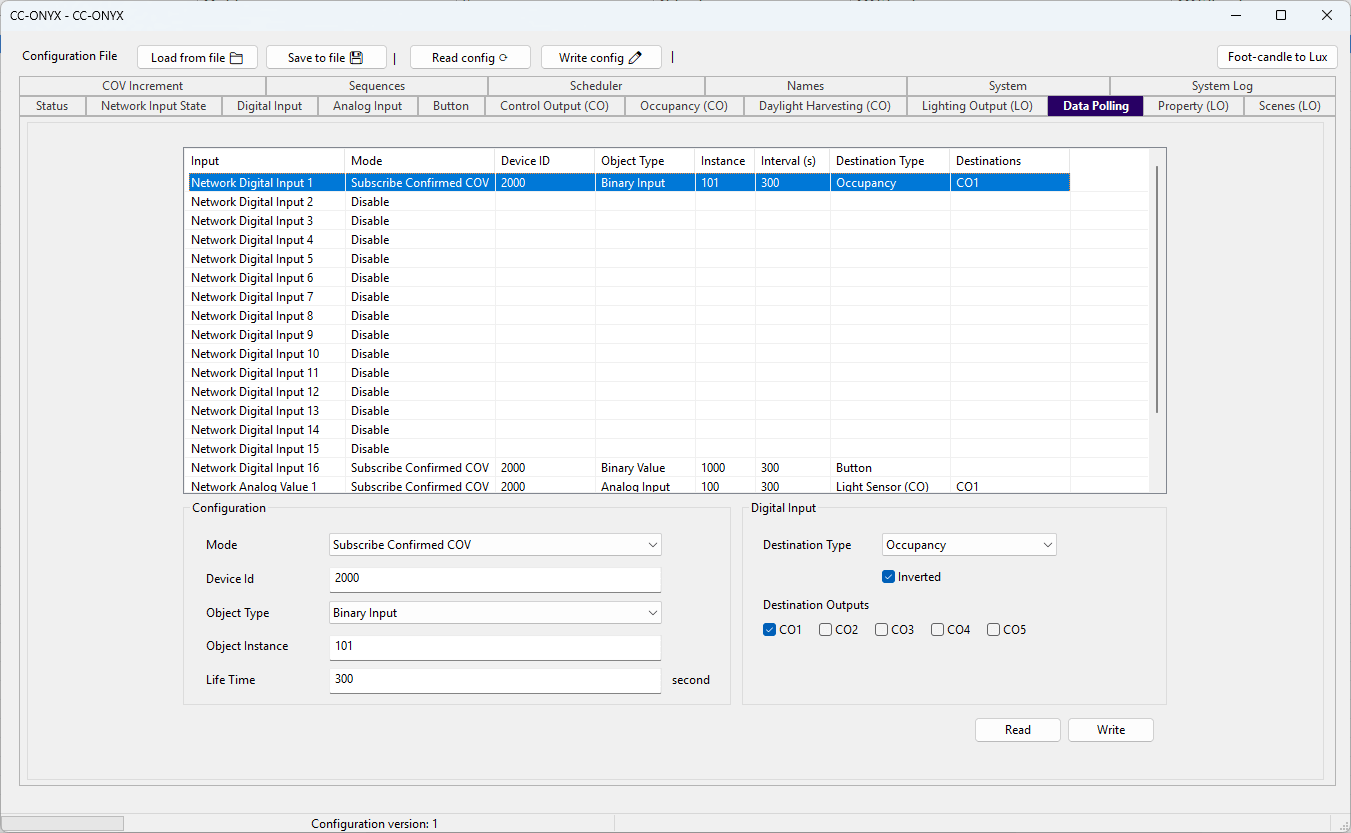
The Data Polling tab configures how the device reads values from other BACnet devices on the network. Each row is a network input that can be fed by a COV subscription or by periodic reads. The list at the top shows every input with its current settings. Select a row to edit it in the Configuration panel below.
There are 20 network inputs:
Network Digital Input 1toNetwork Digital Input 16, each fed from a remote binary value and routed to a button or occupancy destination.Network Analog Value 1toNetwork Analog Value 4, each fed from a remote analog value and routed to a light sensor or potentiometer destination.
Input list
| Column | Description |
|---|---|
| Input | Name of the network input (Network Digital Input 1 to Network Digital Input 16, Network Analog Value 1 to Network Analog Value 4). |
| Mode | Acquisition mode for the input (Disable, Subscribe Confirmed COV, Subscribe Unconfirmed COV, or Polling / COV without subscription). |
| Device ID | Device identifier of the remote device. |
| Object Type | BACnet object type read on the remote device. |
| Instance | Instance number of the remote object. |
| Interval (s) | COV subscription lifetime, or the polling interval, in seconds. |
| Destination Type | Where the acquired value is routed (Button, Occupancy, Light Sensor (CO), or Potentiometer (LO)). |
| Destinations | Outputs driven by the value, listed as CO1 to CO5 or LO1 to LO5. |
Configuration
Edit the selected input with the fields in the Configuration panel.
| Field | Description |
|---|---|
| Mode | Acquisition mode for the input. Disable deactivates the input. Subscribe Confirmed COV and Subscribe Unconfirmed COV subscribe to change-of-value notifications from the remote object. Polling / COV without subscription reads the remote object at a fixed interval instead of subscribing. |
| Device Id | Device identifier of the remote device to read from. |
| Object Type | BACnet object type to read (Analog Input, Analog Output, Analog Value, Binary Input, Binary Output, Binary Value, Multi-state Input, Multi-state Output, or Multi-state Value). |
| Object Instance | Instance number of the remote object. |
| Life Time / Interval | COV subscription lifetime, in seconds, for the two Subscribe modes. For the Polling / COV without subscription mode the label changes to Interval and sets the read period, in seconds. |
Destination
Digital Input
Shown for Network Digital Input 1 to Network Digital Input 16.
| Field | Description |
|---|---|
| Destination Type | Where the digital input value is routed: Disabled, Button, or Occupancy. |
| Inverted | When checked, the incoming value is inverted before it is applied. |
| Destination Outputs | Five checkboxes, CO1 to CO5, selecting the control outputs the occupancy value drives. Shown only when the destination type is Occupancy. |
Analog Value
Shown for Network Analog Value 1 to Network Analog Value 4.
| Field | Description |
|---|---|
| Destination Type | Where the analog value is routed: Disabled, Light Sensor (CO), or Potentiometer (LO). |
| Destination Outputs | Five checkboxes selecting the outputs the value drives. Shown for any destination type other than Disabled. The checkboxes are labelled CO1 to CO5 for a Light Sensor (CO) destination and LO1 to LO5 for a Potentiometer (LO) destination. |
Read and Write
Use Read to load the current data polling configuration from the device, and Write to send the edited configuration back to the device.