Analog Input
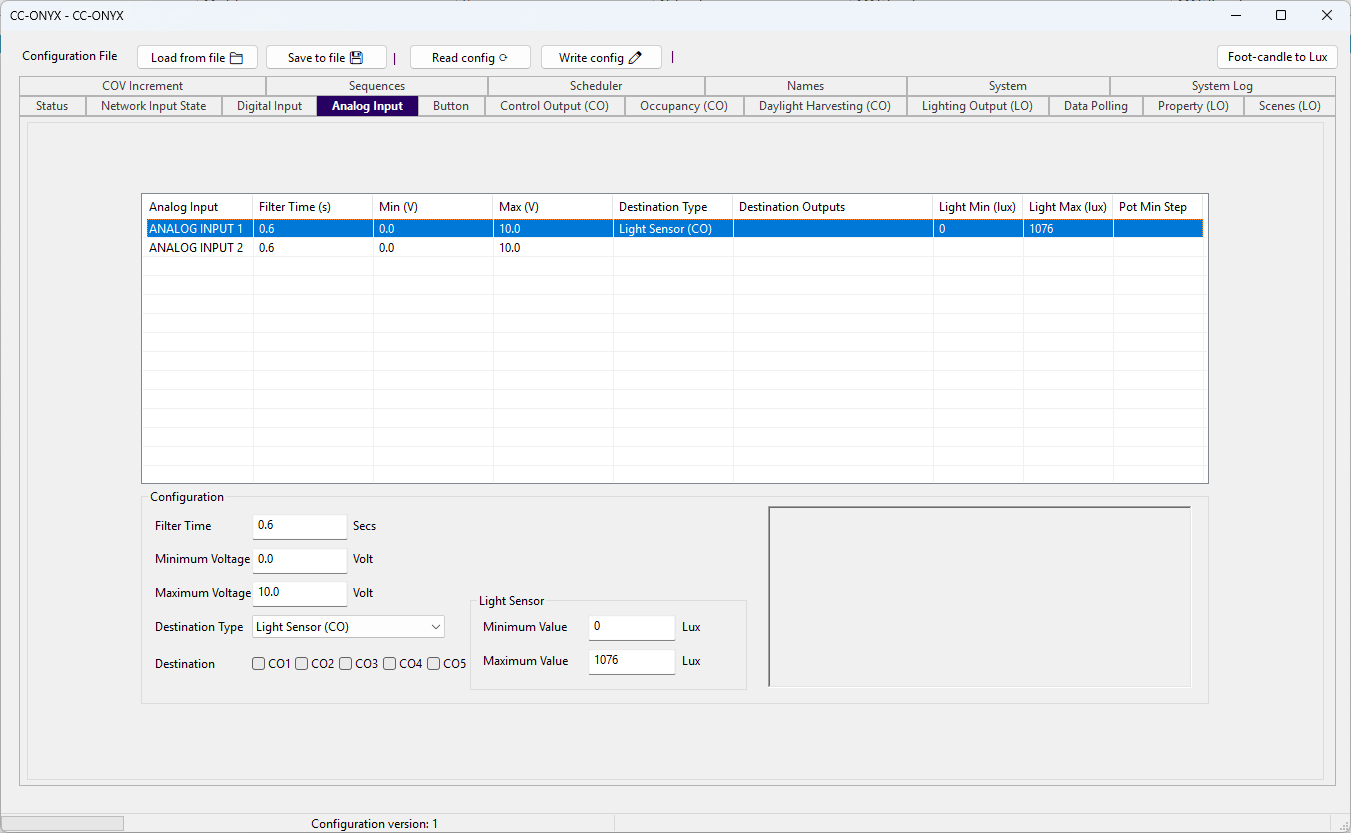
The Analog Input tab configures how the controller interprets its two 0-10 Vdc analog inputs. The list at the top shows every input with its current settings. Select a row to edit it in the Configuration panel below.
Input list
| Column | Description |
|---|---|
| Analog Input | Name of the input (ANALOG INPUT 1 or ANALOG INPUT 2). |
| Filter Time (s) | Time constant applied to smooth the measured voltage, in seconds. |
| Min (V) | Voltage that corresponds to the low end of the input range. |
| Max (V) | Voltage that corresponds to the high end of the input range. |
| Destination Type | How the input is used: Potentiometer (LO) drives the light outputs, Light Sensor (CO) drives the control outputs. |
| Destination Outputs | Outputs driven by the input. Light outputs (LO) for a potentiometer, control outputs (CO) for a light sensor. |
| Light Min (lux) | Light level that corresponds to the minimum voltage. Only used for a light sensor. |
| Light Max (lux) | Light level that corresponds to the maximum voltage. Only used for a light sensor. |
| Pot Min Step | Minimum voltage change required before the potentiometer updates the outputs. Only used for a potentiometer. |
Configuration
Edit the selected input with the fields in the Configuration panel. The available fields depend on the selected Destination Type.
| Field | Description |
|---|---|
| Filter Time | Time constant applied to smooth the measured voltage, in seconds. |
| Minimum Voltage | Voltage that corresponds to the low end of the input range, in volts. Range 0.0 to 10.0 V. |
| Maximum Voltage | Voltage that corresponds to the high end of the input range, in volts. Range 0.0 to 10.0 V. |
| Destination Type | Choose whether this analog input drives the light outputs (Potentiometer (LO)) or the control outputs (Light Sensor (CO)). |
| Destination | The outputs driven by this input. Any combination can be selected. |
Destination
When a Destination Type is selected, a set of five checkboxes appears. Their labels follow the destination type: LO1 to LO5 for a potentiometer, CO1 to CO5 for a light sensor. Check each output that this input should drive.
Potentiometer
Use the Potentiometer (LO) type for a manual dimming knob wired to the analog input. The measured voltage is converted to a level from 0 to 100 percent (using Minimum Voltage and Maximum Voltage) and applied directly to the selected light outputs, so turning the knob dims the lights in real time.
When Destination Type is set to Potentiometer (LO), a Step Value field appears.
| Field | Description |
|---|---|
| Step Value | Minimum voltage change required before the potentiometer updates the light outputs, in volts. Range 0.0 to 10.0 V. |
Light Sensor
Use the Light Sensor (CO) type for a 0-10 Vdc light level sensor. The measured voltage is converted to a light level in lux (using the range below) and fed to the selected control outputs as their daylight source, which lets those outputs perform daylight harvesting by dimming the lights as ambient light rises.
When Destination Type is set to Light Sensor (CO), a Light Sensor group appears to map the voltage range to a light level.
| Field | Description |
|---|---|
| Minimum Value | Light level, in lux, that corresponds to the Minimum Voltage. |
| Maximum Value | Light level, in lux, that corresponds to the Maximum Voltage. |