Control Output (CO)
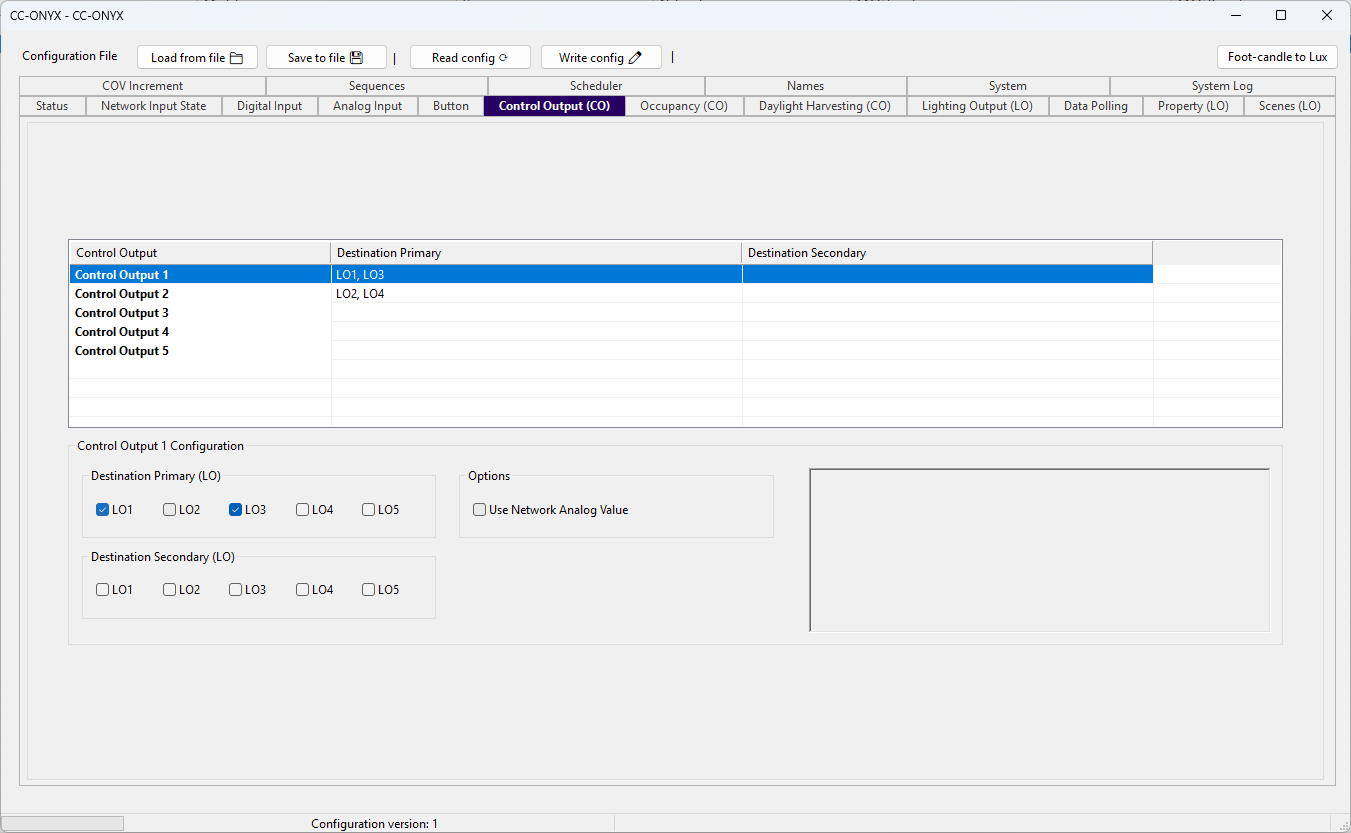
The Control Output tab maps each control output to the light outputs it drives. The list at the top shows every control output with its current destinations. Select a row to edit it in the Configuration panel below.
Control output list
| Column | Description |
|---|---|
| Control Output | Name of the control output (Control Output 1 to Control Output 5). |
| Destination Primary | Light outputs driven as the primary destination, listed as LO1 to LO5. |
| Destination Secondary | Light outputs driven as the secondary destination, listed as LO1 to LO5. |
Configuration
Edit the selected control output with the fields in the Configuration panel. The panel title shows which control output is being edited, for example Control Output 1 Configuration.
Destination Primary (LO)
Five checkboxes, LO1 to LO5, select the light outputs driven as the primary destination of this control output. Any combination can be selected.
Destination Secondary (LO)
Five checkboxes, LO1 to LO5, select the light outputs driven as the secondary destination of this control output. Any combination can be selected.
Options
| Field | Description |
|---|---|
| Use Network Analog Value | When checked, the control output takes its daylight value from a network Analog Value object instead of a light sensor wired to a physical analog input. |