Configuring the sequencer
The sequencer runs ordered lists of variable writes, called sequences. Each sequence writes a series of values to dataserver variables, one step at a time, with a configurable delay before each step. A sequence starts, stops, pauses and resumes based on the value of a trigger variable, so you can drive it from a schedule, an alarm, a button on a floor plan or any other logic that can write the trigger variable.
To configure the sequencer, follow these steps.
-
Sign in to Jasper as an administrator.
-
Open the Data menu and choose Sequencer under the Variables heading. The Sequencer Configuration page appears.
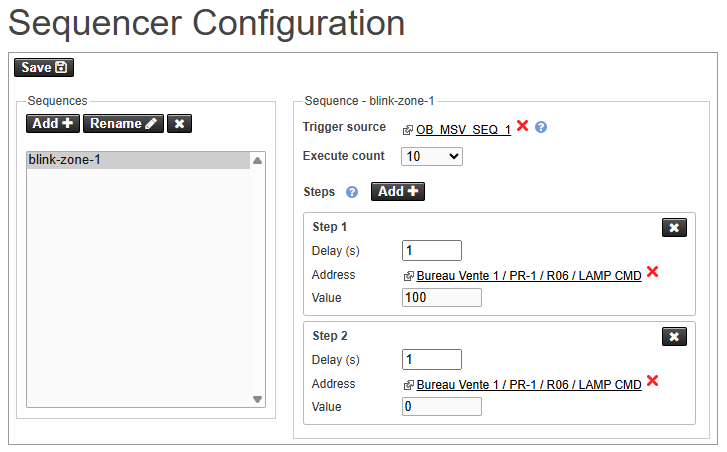
The page has two panels: the Sequences list on the left and the details of the selected sequence on the right. Once you have configured your sequences, click the Save button. Jasper may prompt you to restart the system to have your changes take effect.
Managing sequences
Use the buttons above the Sequences list to manage sequences.
Add
Create a new sequence. A dialog box appears where you can enter the name of the new sequence.
Rename
Rename the sequence currently selected in the list.
Red “X”
Delete the sequence currently selected in the list.
Sequences
The list of all sequences. Click a sequence to show its settings and steps in the panel to the right.
Configuring a sequence
Select a sequence in the list to configure its trigger, execute count and steps.
Trigger source
The variable that controls the sequence. Click the link to select a variable, or click the red “X” to clear it. Use a multi-state variable where it is possible to write one of these values to it:
- 1 = Start
- 2 = Stop
- 3 = Pause
- 4 = Resume
Execute count
The number of times the sequence runs each time it is started, from 1 to 254, or Infinite. An infinite sequence repeats until it is stopped, and its steps must total at least one second of delay per iteration to prevent a runaway loop.
Configuring steps
The Steps section lists the writes the sequence performs. Steps run from top to bottom. Click Add to append a step, and click the red “X” on a step to delete it.
Delay (s)
The number of seconds Jasper waits before it runs this step. Use 0 to run the step without waiting.
Address
The target variable to write. Click the link to select a variable, or click the red “X” to clear it.
Value
The value to write to the target variable.
Each sequence requires a trigger source and at least one step, and each step requires an address and a value. If any of these are missing when you save, Jasper reports the sequence and step that need attention.