Components of Your Jasper System
The Jasper building control system consists of several components that must be configured separately.
This section explains these components and how they interact with one another. This knowledge makes it easier to configure each component.
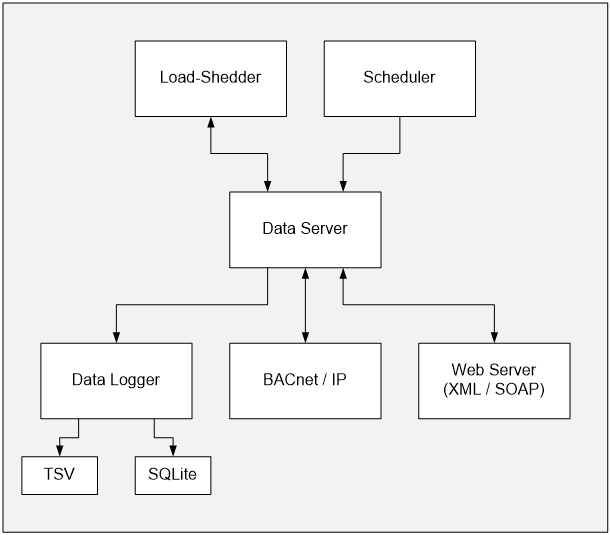
Dataserver
Jasper's dataserver:
-
stores information for controllers and devices.
-
stores the network communication type.
-
transmits and updates values for variables that other Jasper components read and update. These values determine the behaviour of BACnet components.
While new commands are sent instantly, large volumes of dataserver polling can delay the refresh of panels run by the dataserver.
Network notes
-
The dataserver mainly uses the BACnet/IP type of network.
-
It is possible to access other types of networks, such as BACnet MS/TP, using IP to MS/TP routers.
-
The dataserver can access defined points in an Echelon iLon-100 using the XML/SOAP protocol. This makes it possible to exchange information between networks. However, limitations in speed, memory, and i.LON message size prevent connection of a complex LonWorks network to Jasper.
-
Certain groups of variables are defined in the dataserver. These definitions make it possible to apply values to each member of those groups.
About Jasper variables
In Jasper's user interface, variables may refer to several different types of components:
-
BACnet objects internal to Jasper
-
BACnet objects managed by other controllers
-
groups of variables
Jasper interfaces with these different types of components in the same ways.
Note: in this manual, the terms “variable” and “object” are used interchangeably.
Writing variable values
When the dataserver scans variables, the controller prioritizes writing over reading. Jasper also uses the sequence described below to reduce latency if, for instance, a control card does not reply right away or its network is not responsive.
When Jasper first addresses a control card, it sends write commands. Then it waits for acknowledgement that the write command was successful before it sends the next command.
The next write command is done on the next control card, not the next variable of the same card. Jasper continues with this sequence, jumping from one card to the next, updating one variable on each card, before writing the next variable value on the first card in the sequence.
Jasper continues this process until it has updated all variables for a given operation.
Consider this example:
| Card | Variables to update |
|---|---|
| 1 | A, B |
| 2 | C, D, E, F |
| 3 | G |
Jasper updates the variables in this sequence:
-
Card 1, Variable A
-
Card 2, Variable C
-
Card 3, Variable G
-
Card 1, Variable B
-
Card 2, Variable D
-
Card 2, Variable E
-
Card 2, Variable F
Reading variable values
The dataserver reads all variables in sequence. When possible, it reads multiple values at once on the same control card to improve response time.
You can:
-
disable read operations on variables when you write to them.
-
adjust time between variable readings according to the use of each variable. Setting this delay properly helps you avoid network congestion. When a value cannot be read for a set interval, it becomes invalid.
Other Jasper components query variables on the dataserver instead of sending their queries to the BACnet devices. This makes the system faster since the dataserver returns current values more quickly.
Data Logger
The dataserver calls the data logger when a network value is updated. The data logger receives these updates and records them if:
-
they vary enough from their previous value.
-
the logger has not recorded any changes during a set amount of time.
The output can be saved in either a:
-
SQLite database (for generating reports and graphics within Jasper)
-
tab-separated values (.tsv) file (if you need to export values from Jasper)
Web Server
The web server's configuration pages modify Jasper's configuration files. To have the changes take effect, you need to restart Jasper. For more information, refer to System status.
To enable the connection between the web server and the dataserver, you can use one of these interfaces:
-
XML / SOAP
-
JSON / WebSocket
Scheduler
The scheduler lets you:
-
schedule the transmission of new values to variables in the dataserver at a preset time of day. For example, the scheduler can scan "ON" and "OFF" lighting periods, or "Occupied" and "Unoccupied" for thermostats.
-
set events triggered by sunrise and sunset times (astronomic configuration). For more information, refer to the Jasper Building Control User Manual.
-
send analog values such as temperatures or percentages.
BACnet objects
Certain BACnet objects (e.g. Load Shedder) are Jasper-specific functions. You can view these objects on the BACnet network as BACnet standard objects.
When writing a value to a BACnet object, the new value can be propagated to the dataserver and elsewhere on the network if there is a binding using this BACnet object as a source.
Load Shedder
The load-shedder handles power management. Jasper can run several load shedders at the same time. Each load shedder works independently and has its own BACnet objects.
The dataserver manages most load-shedder interactions. These include:
-
writing load-shedding settings.
-
reading load-shedding state feedback, such as consumption or temperatures.
You can use Jasper's BACnet objects to access certain load-shedder information like:
-
the power setpoint.
-
the number of steps allowed by the load-shedder.