Configuring Lighting Statistics
Building managers use lighting statistics to help them run their buildings efficiently. For instance, they may want to calculate electricity consumption through a given control, or they may want to determine when to relamp.
For more information on usage of lighting statistics, refer to “Viewing lighting statistics” in the Cristal Controls Jasper User Manual*.*
For managers to use these statistics, you need to configure them.
To configure lighting statistics, follow these steps.
-
Sign in to Jasper as an administrator.
-
Open the Loggers menu and choose Lighting Statistics Configuration under the Statistics heading.
The Lighting Statistics Configuration page appears.
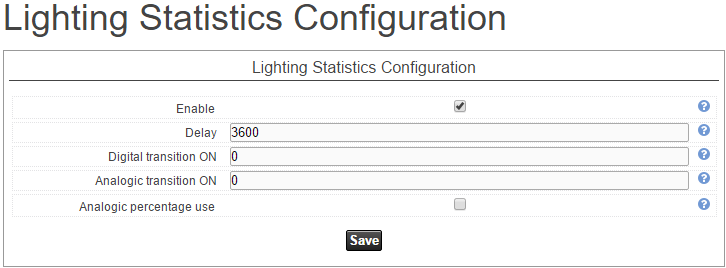
Enable
Select this check box to have Jasper periodically save statistics.
Delay
With Enable (above) selected, type the number of seconds between write-to-disk operations.
The default is one hour (3,600 seconds). Too small a delay may prematurely age the recording device's flash memory. Too long a delay increases the risk of data loss during a power failure.
Digital transition ON
Added time (in seconds) in a transition OFF to ON for digital controls. The default value is 0 (blank field).
Analog transition ON
Added time (in seconds) in a transition OFF to ON for analog controls. The default value is 0 (blank field).
Analog percentage use
Click this check box to record the proportion of electricity used by analog controls. For example, if an LED bulb is on for one hour at 50 per cent intensity, this period counts as 30 minutes of the bulb's lifespan.
This percentage helps you estimate a device's remaining lifespan. The lower the percentage use of a device, the longer its expected lifespan.
Once you have configured lighting statistics, click the Save button. Jasper will prompt you to restart the system to have your changes take effect.