Configuration
The thermostat can be configured using the Cristal Controls "BACnet Browser" software. This software allows you to read ("Read Config" button) and write ("Send Config" button) the CCTHV-407 configuration. The configuration can also be saved ("Save Config" button) and read ("Load Config" button) the configuration in a file. The button "Clone Config" allows sending a similar configuration to multiple thermostats. Here are the different CCTHV-407 configurations and their uses.
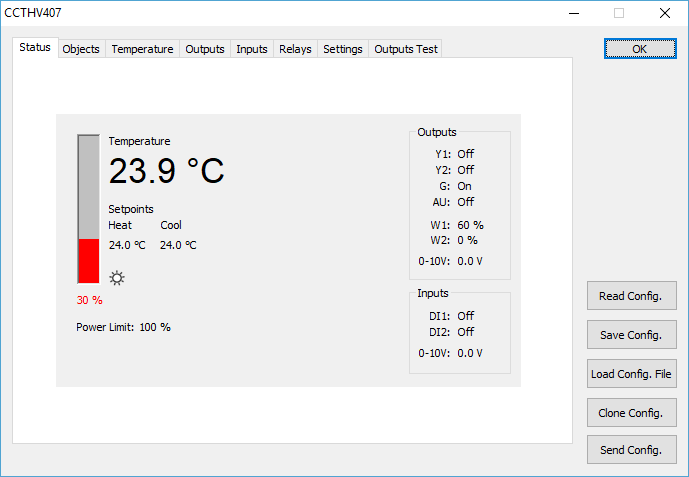
Figure 8 - Status
"Objects"
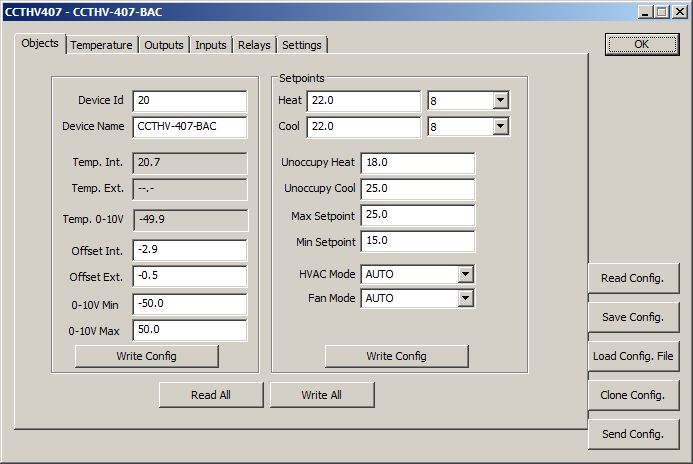
Figure 9 - Objects tab
The "Objects" tab provides access to the configuration of BACnet objects. You can configure the "Device Id", the "Device Name" as well as adjustments to the two temperature sensors. Different setpoints can be changed, and the maximum and minimum allowable when the user changes the setpoints. Temperature read by the 2 probes is also shown (Note: temperatures are read only once and are not updated). You can change the operating modes of the thermostat ("HVAC Mode" and "Fan Mode").
The "SET-POINT HEAT UNOCC" and " SET-POINT COOL UNOCC " values indicate the setpoint in heating and cooling use when the thermostat is in unoccupied mode. A positive value indicates the setpoint to be used directly. A negative value (between 0 ° C and -5 ° C) indicates that the unoccupied setpoint is relative to the value of the occupied setpoint. Unoccupied heating setpoint is equal to the occupied heating setpoint plus the setpoint unoccupied. The cooling setpoint is equal to the unoccupied cooling setpoint occupied subtracted from the unoccupied setpoint.
Temperature
This tab is to select the temperature sensor to be used, either the thermostat internal sensor, an external sensor to be connected to the corresponding input or a temperature reading connected to a 0-10V input. See the "Remote Temperature" section for the specifications required to use an external probe. See the "0-10Vdc" section for the specifications required to use the 0-10Vdc input. The value of "Temp. filter time" indicates the time constant of the filter imposed on the temperature. This value limits the rate of change on the temperature reading, thus eliminating temporary disturbances. It is recommended keeping the default setting at (60). When this value decreases, the temperature varies more rapidly, and it varies more slowly when increasing the value.
HVAC Outputs
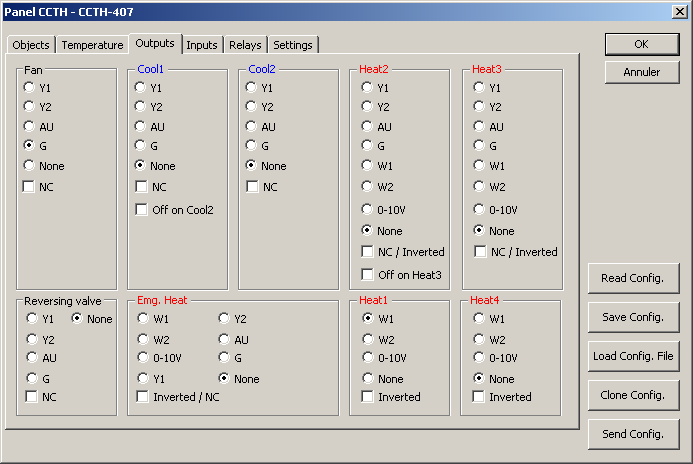
Figure 10 - HVAC Outputs tab
This tab allows the "outputs" configuration use for heating and cooling. You can configure the "Fan", "Cool1", "Cool2", "Heat2" and "Heat3" stages on the desired output. Those stages are ON/OFF stage. The "Heat1" and "Heat4" stages are used as modulating outputs. Select "None" to indicate that a stage is not used in the thermostat configuration.
On the output configuration the option "NC / Inverted" or "Inverted" is used to indicate that the output is normally closed (i.e. the relay makes contact) or the analog output is at 100% when the corresponding stage is not enabled. When modulating the output, the signal will also be reversed and then use its maximum output when demand is 0%. The output is at its minimum when demand is higher.
The "Off on Cool2" and "Off on Heat3" options of "Cool1" and "Heat2" stages indicate that when moving to a higher stage ("Cool2" in the case of "Cool1" and "Heat3" in the case of "Heat2"), the lower stage is disabled. When you return to the stage below, it is reactivated.
A reversing valve can be configured. The relay then makes contact when the thermostat is in cooling mode. It can also reverse this configuration by using the "NC" and thus make contact when the thermostat is on heating mode.
"Cool1", "Cool2", "Heat2" and "Heat3" stages are considered using a compressor. Starts and stops of these 4 stages are limited by the properties "Min. ON Time" and "Min. Time OFF" in the "Settings" tab.
The "Emg. Heat" stage is used to configure a modulated or relay output to be used when the system is on the "Emergency Heat" mode. The options "NC / Inverted" reverse the operating mode of the output according to its type used.
Digital Inputs
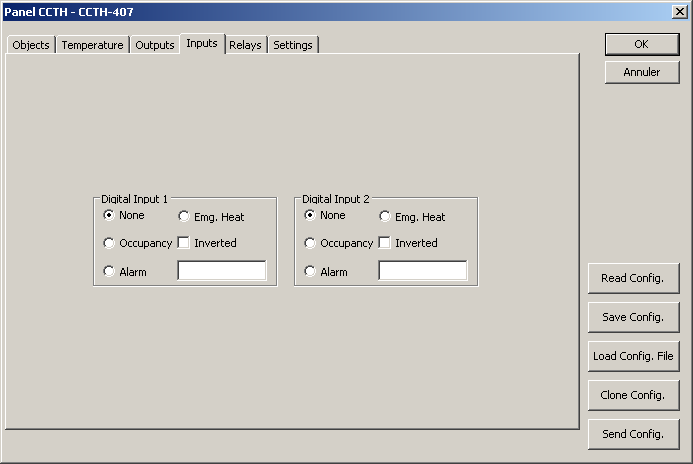
Figure 11 - Inputs tab
This tab allows the configuration of the digital inputs so they perform different tasks. The option "Occupancy" allows the input to change the occupancy mode of the thermostat. The option "Alarm" allows the input to control the display of an alarm that will be displayed on the screen.
The alarm message is limited to 8 characters and must be entered in the text box option. The option "Emg. Heat" allows the activation of the "Emergency Heat" stage by the digital input. The various options are normally activated when the digital input makes contact, and can reverse this operation with the "Inverted" checkbox.
Relays
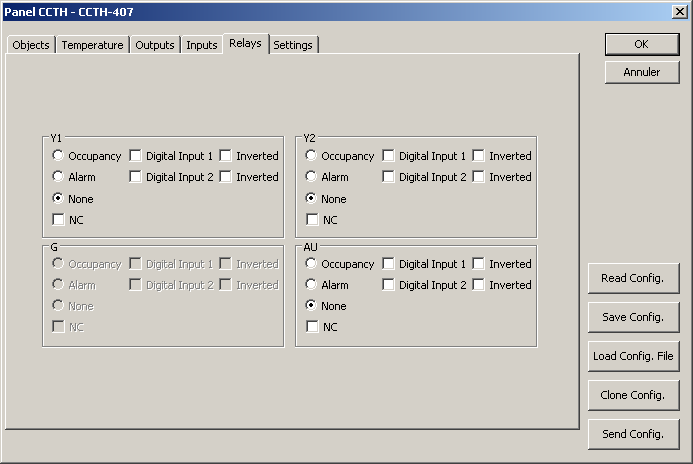
Figure 12 - Relays tab
This tab allows the configuration of the relays so that they perform other tasks than output for the different stages of heating and cooling. When a relay is already used in the "Output" tab, it is not configurable in the "Relays" tab. The "Occupancy" option has the relay to change its state when the occupancy of the thermostat changes. The relay then makes contact when the thermostat is in occupancy but using the "NC" option can reverse it. The option "Alarm" has the relay to make contact when a selected digital input is connected. Both digital inputs can be activated for a relay so the relay will make contact when one of the digital inputs is connected. The "Inverted" options enable the corresponding relay contact when the input is open and the "NC" option allows the relay to be normally closed.
System Settings
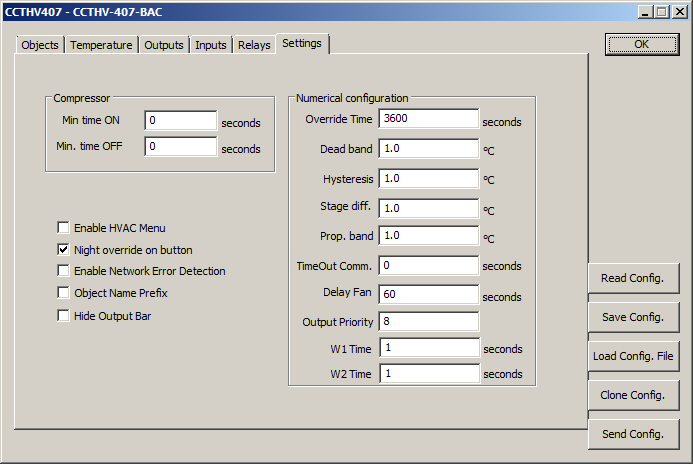
Figure 13 - Settings tab
This tab allows the configuration of different numerical values managing the system behavior. Here are the configurable numerical values and their descriptions.
| Values | Description | Units | Default | Note |
| "Dead band" | Difference between the heating and cooling setpoints. | Degrees Celsius | 1.0 | |
| "Hysteresis" | Difference between the activation and deactivation of the "Heat2", "Heat3", "Cool1" and "Cool2" stages. | Degrees Celsius | 1.0 | |
| "Stage diff." | Difference between Cooling or Heating stages (ex. : between "Cool1" and "Cool2") | Degrees Celsius | 1.0 | |
| "Prop. Band" | Gap on which the modulated heat stages increase the output from 0% to 100% | Degrees Celsius | 1.0 | |
| "Override time" | Length of the bypass of the unoccupied setpoint. | Seconds | 3600 | |
| "TimeOut Comm." | Maximum delay between each writing from the master controller. Zero = disable. | Seconds | 0 (Inactive) | 1 |
| "Delay Fan" | Delay between the Cooling / Heating deactivation and the deactivation of the fan. | Seconds | 60 | |
| "Temp. Filter time" | Filter time constant of the temperature. | Seconds | 60 | 2 |
| "Output Priority" | Priority the CCTHV-407 use to write in the BACnet objects. | No Units | 8 | |
| "Min. time ON" | Minimum operation time of the compressor once it is running. (Cool1 and Heat2) | Seconds | 0 | |
| "Min. time OFF" | Minimum operation time of the compressor once it is not running. (Cool1 and Heat2) | Seconds | 0 | |
| W1 Time | Triac W1 period | Seconds | 1 | |
| W2 Time | Triac W2 period | Seconds | 1 |
Note:
-
After the delay has expired, the thermostat sees that a problem has occurred. It changes the value of the BACnet object "Power Limit" to 100%, it changes the occupancy to "occupy" and change the value of the BACnet "HVAC Mode" to "Auto".
-
On a temperature changes, this value indicates the time taken by the system to allow the change to be considered at 63%. 2 times after that period, the change is considered to 86% and 95% after 3 times this period. This value helps the reading not to vary too quickly during an abrupt temporary temperature variation.
Configuration Buttons
The "Read Config", "Save Config", "Load Config", "Clone Config" and "Send Config" buttons are used to manage the configuration of the "Temperature", "Outputs", "Input", "Relays" and "Settings" tabs. The "Objects" tab performs reads and writes in the BACnet objects available directly in the tab. Here are the different buttons functions:
-
"Read Config": Re-read the CCTHV-407 configuration.
-
"Save Config": Write the CCTHV-407 configuration in a file.
-
"Load Config": Read a configuration from a file.
-
"Send Config": Send the configuration to the CCTHV-407.
-
"Clone Config": see next section.
"Clone Config." Button
When using the button "Clone Config. "The following interface appears:
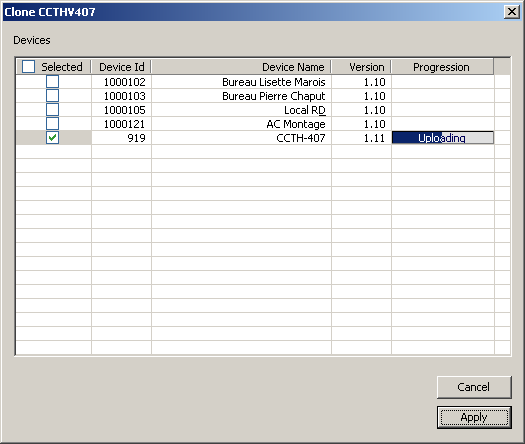
Figure 14 - "Clone config." interface
The configuration defined in the tabs "Temperature", "Outputs", "Input", "Relays" and "Settings" can be sent to selected thermostats in the column "Selected". Pressing the column headers will sort the values below. The configuration is sent to the selected thermostats by pressing the button "Apply" and you can follow the progress of sending in the column "Progress".
System operation
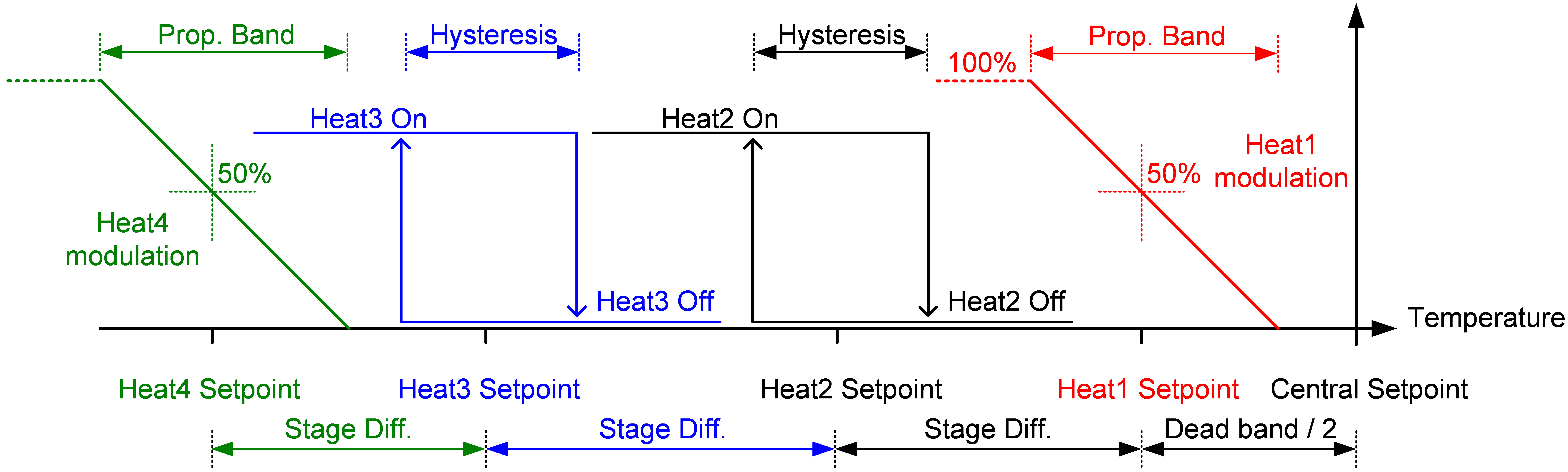
Figure 15 - Heating schematic
Above is a diagram showing the heating operation. This scheme allows you to view changes made by each configuration on the system dynamics.
Diagram showing the operation of the cooling:
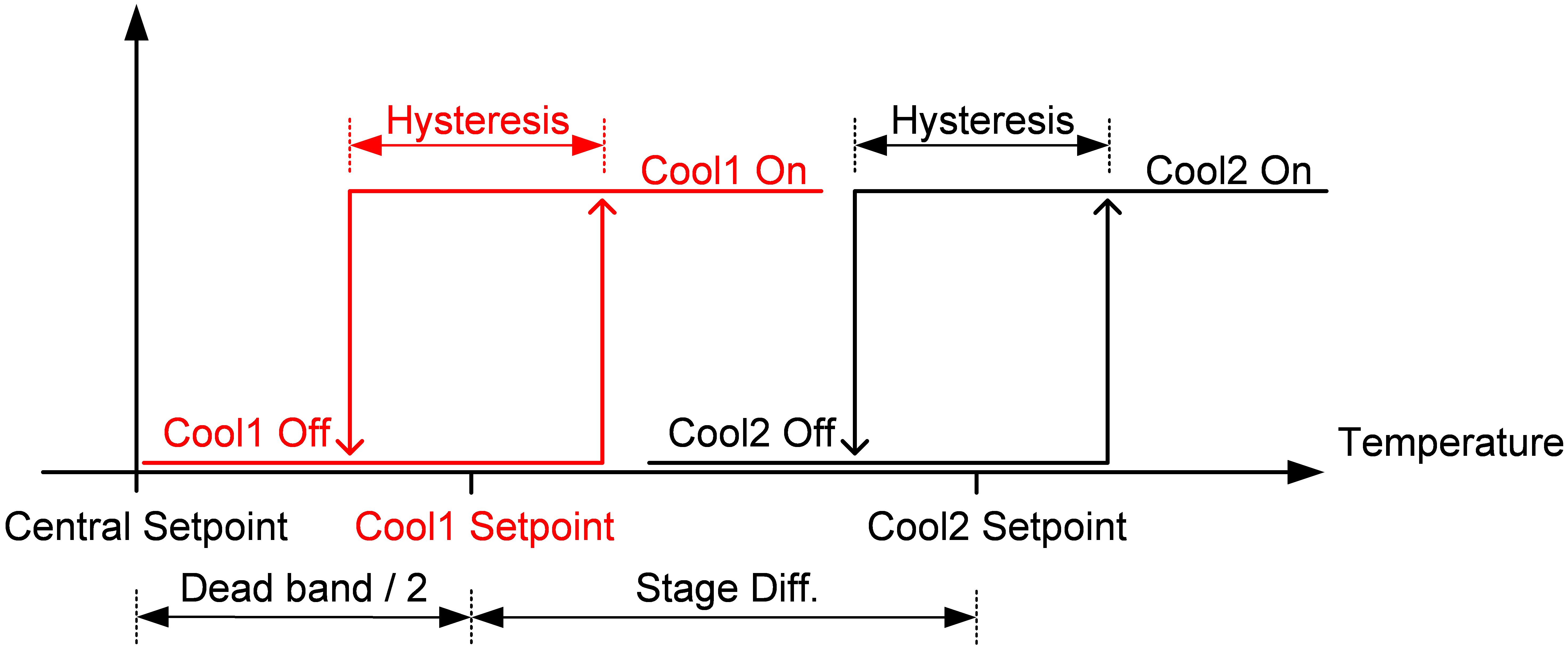
Figure 16 - Cooling schematic
The "Central Setpoint" value is the setpoint displayed on the thermostat LCD and is changed by the user. The value "Stage Diff" applies a difference between each configured stage. If a stage is not configured, the upper stages will take the place of the missing stage. Thus, if the "Heat1" stage is absent, the "Heat2" stage will take place at the "Heat Setpoint" value, and the "Heat3" stage will move to the "Heat Setpoint - Stage Diff" value and so on. The same thing happens with cooling, but the use of a "Cool2" stage when no "Cool1" stage is configured may seem absurd.
When configuring and using a "Emg. Heat" stage, it is placed at the value "Setpoint Heat" as the "Heat1" stage.